
- BARCODE
- Barcode Printing Solution
- Biometrics Attendance System
- Camera
- Document Scanner
- ID Cards
- Kiosk
- Mobile Computer
- POS Accessories
- POS Machines
- Price Checker Kios
- Printing Supplies
- RECEIPT PRINTER
- RFID & Hardware Solutions
- Tablet
- Uncategorized
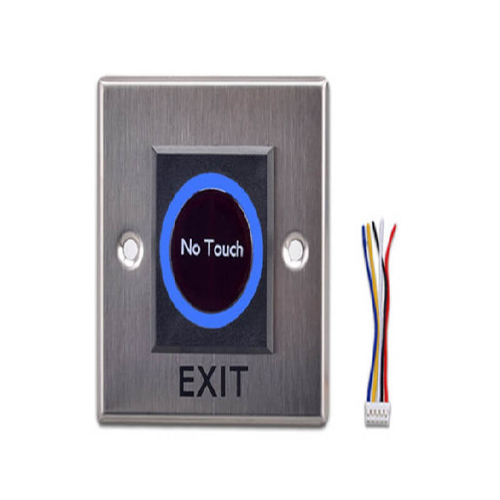
ZNT-P23 Non Touch Push Button Biometrics Attendance System
ZNT-P23 Non Touch Push Button Biometrics Attendance System
Zahabi ZNT R23 Non Rouch Push Button
Product Details
Q1. What is the Zahabi ZNT‑P23 non‑touch push button used for?
ZNT‑P23 is a touch‑free, infrared‑based exit button used with biometric attendance and access control systems to unlock doors without physical contact. Users simply wave a hand near the button to trigger the exit relay and open the door.
Q2. Why choose a non‑touch exit button instead of a normal push button?
Non‑touch buttons like ZNT‑P23 improve hygiene and reduce wear because users do not need to press a mechanical surface. This is especially important in offices, clinics, schools, and other public spaces where many people use the same door.
Q3. How does ZNT‑P23 detect a hand to open the door?
ZNT‑P23 uses an infrared sensor to detect a hand approaching within its detection range and then switches its relay output from standby to active. Typically, the LED stays one colour in standby and changes colour when the sensor detects a hand and sends the exit signal.
Q4. What is the detection range and power requirement for ZNT‑P23?
Typical non‑touch exit buttons operate from DC 9–12 V and detect hand movement within several centimetres of the sensor surface. Exact detection distance and current draw depend on the specific model and can be confirmed in the product specs.
Q5. Can ZNT‑P23 be used with any biometric or access controller?
Yes, as long as the controller supports a standard NO/NC exit input, ZNT‑P23 can be wired to send a momentary exit signal to release the lock. It acts like a normal exit button, but triggered by a hand gesture instead of a mechanical press.
Q6. Is ZNT‑P23 suitable for high‑traffic, hygiene‑sensitive areas?
Non‑touch exit buttons are recommended for high‑traffic doors in offices, hospitals, clinics, and food‑related areas where reducing touch points is important. ZNT‑P23 is a good match for these environments when used with Zahabi’s biometric attendance solutions.
Hygiene and use‑case evaluation for non‑touch exits
Zahabi reviews your door locations and traffic patterns and advises where ZNT‑P23 non‑touch buttons make more sense than standard mechanical push buttons.
Sensor placement and detection range tuning
You receive guidance on mounting height, orientation, and detection distance so the sensor detects hands reliably without accidental triggers from passers‑by.
Wiring to access controller and lock
Zahabi can share clear wiring instructions for connecting ZNT‑P23 to your access controller’s exit input, including NO/NC selection and relay timing considerations.
LED indication and user instruction
Support includes suggestions for using the LED colours and simple signage so users understand how to wave near the button to exit quickly and safely.
Troubleshooting false triggers or missed detections
If the button activates too easily or fails to detect hands, Zahabi walks you through checking wiring, power, mounting position, and sensitivity settings.
Standardising touch‑free exits across the site
For larger sites, Zahabi helps plan where to deploy ZNT‑P23 and align them with your biometric and access control design for a consistent, touch‑free exit experience.
Tech Specs
Rating & Reviews
How We Can Help You

Wide Selection, Better Choices
Find products that match your exact needs without compromise.

Built for Performance
High-quality materials and tested reliability you can depend on.

Smartly Curated
Only the best products make it to our platform, saving you time and effort.

Customer-First Approach
Trusted by shoppers who value quality, service, and consistency.

Drivers, Manuals & Support
Zahabi Support
From drivers and manuals to diagnostic tools and replacement parts, Zahabi Product Support has you covered!
You may add any content here from XStore Control Panel->Sales booster->Request a quote->Ask a question notification
At sem a enim eu vulputate nullam convallis Iaculis vitae odio faucibus adipiscing urna.