
- BARCODE
- Barcode Printing Solution
- Biometrics Attendance System
- Camera
- Document Scanner
- ID Cards
- Kiosk
- Mobile Computer
- POS Accessories
- POS Machines
- Price Checker Kios
- Printing Supplies
- RECEIPT PRINTER
- RFID & Hardware Solutions
- Tablet
- Uncategorized
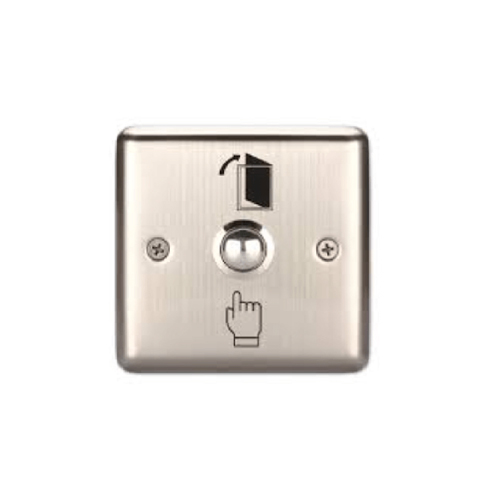
ZPB-P21 Biometrics Attendance System Accessory
ZPB-P21 Biometrics Attendance System Accessory
Zahabi ZPB P21 Push Button
Product Details
Q1. What is the Zahabi ZPB‑P21 push button used for?
ZPB‑P21 is a manual “Push to Exit” button used with biometric attendance and access control systems to release an electric lock and allow people to exit safely. It is typically mounted near the door on the secure side and sends a momentary signal to unlock the door when pressed.
Q2. Can the ZPB‑P21 work with my existing biometric or access controller?
Yes, ZPB‑P21 is designed to connect to standard access control panels, door controllers, and biometric terminals that accept a NO/NC exit input. It can momentarily activate or deactivate most fail‑safe or fail‑secure electric locks used in attendance and access systems.
Q3. Where is the ZPB‑P21 typically installed?
The ZPB‑P21 is usually installed inside the secure area, close to the door frame at a convenient hand height. Staff press it when they wish to exit, and the signal triggers the controller or lock to release the door for a short time.
Q4. Is ZPB‑P21 suitable for doors that must always allow free exit?
Yes, a Push to Exit button like ZPB‑P21 is commonly used on doors that must always allow safe egress, even when entry is controlled by biometrics or card access. It provides a clear, simple way to exit while keeping access managed from the outside.
Q5. What type of locks can ZPB‑P21 work with?
ZPB‑P21 can be wired to control fail‑safe or fail‑secure electric locks, strikes, and magnetic locks via the access controller or relay. As long as the access system supports a push‑to‑exit input, the button can be integrated.
Q6. Is ZPB‑P21 suitable for offices, schools, and commercial buildings?
Yes, push‑button exit devices are commonly used in offices, schools, clinics, and commercial buildings as part of access control systems. ZPB‑P21 is a practical, low‑cost accessory that fits well with Zahabi’s biometric attendance solutions.
Exit button and wiring suitability check
Zahabi helps confirm that ZPB‑P21 is compatible with your biometric terminal, access controller, and electric lock, and advises whether to use NO or NC wiring based on your setup.
Guidance on installation location and height
You receive recommendations on where to mount the ZPB‑P21 near the door so it is easy to reach, clearly visible, and compliant with your internal safety policies.
Connection to controller and lock relay
Zahabi can provide simple wiring diagrams and step‑by‑step instructions to connect the push button to your controller’s exit input and ensure correct lock release timing.
Testing and safety checks after installation
Support includes guidance on testing the button, confirming the door releases reliably, and checking behaviour during power failures as required by your security policy.
Troubleshooting unresponsive or stuck exit signals
If the door does not release, releases too long, or behaves unexpectedly, Zahabi walks you through input checks, relay timing, and basic fault isolation.
Planning exit devices across multiple doors
For sites with many doors, Zahabi helps decide where to use push‑to‑exit buttons like ZPB‑P21 versus touch‑free or remote‑controlled options, based on traffic and hygiene needs.
Tech Specs
Rating & Reviews
How We Can Help You

Wide Selection, Better Choices
Find products that match your exact needs without compromise.

Built for Performance
High-quality materials and tested reliability you can depend on.

Smartly Curated
Only the best products make it to our platform, saving you time and effort.

Customer-First Approach
Trusted by shoppers who value quality, service, and consistency.

Drivers, Manuals & Support
Zahabi Support
From drivers and manuals to diagnostic tools and replacement parts, Zahabi Product Support has you covered!
You may add any content here from XStore Control Panel->Sales booster->Request a quote->Ask a question notification
At sem a enim eu vulputate nullam convallis Iaculis vitae odio faucibus adipiscing urna.