
- BARCODE
- Barcode Printing Solution
- Biometrics Attendance System
- Camera
- Document Scanner
- ID Cards
- Kiosk
- Mobile Computer
- POS Accessories
- POS Machines
- Price Checker Kios
- Printing Supplies
- RECEIPT PRINTER
- RFID & Hardware Solutions
- Tablet
- Uncategorized
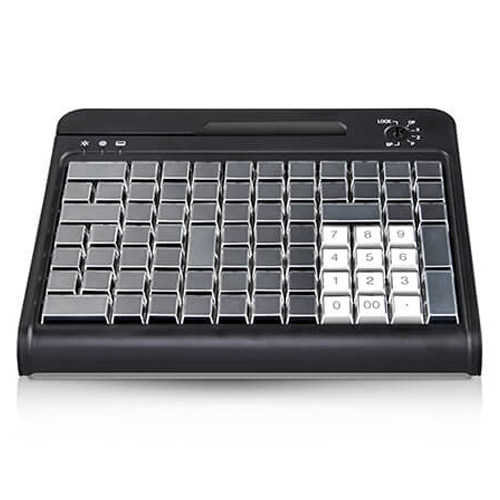
POS Programmable Keyboard
POS Programmable Keyboard
The integrated magnetic stripe reader can read authorization cards, credit card or bank card ETD.
Product Details
Q1. What is the ZKB‑K84 POS programmable keyboard used for?
The ZKB‑K84 is a compact POS programmable keyboard designed for retail, hospitality, and billing counters where operators need quick access to frequently used keys and functions. It helps speed up checkout and data entry at POS stations.
Q2. What does the integrated magnetic stripe reader on ZKB‑K84 do?
The built‑in magnetic stripe reader can read authorisation cards, credit cards, or bank cards and send the card data directly to the POS or application as if typed from the keyboard. This enables payment, loyalty, or operator login via card swipe.
Q3. Can keys on the ZKB‑K84 be programmed for custom POS functions?
Yes, the ZKB‑K84 is a programmable keyboard, so keys can be mapped to specific POS functions, macros, or key sequences such as discounts, PLUs, or shortcuts. This reduces manual typing and helps operators work faster and with fewer errors.
Q4. How does the ZKB‑K84 connect to my POS or PC?
ZKB‑K84 typically connects via USB or PS/2 as a standard keyboard device, so the POS system sees it as a regular keyboard input. This makes integration straightforward with most Windows‑ or Linux‑based POS applications.
Q5. Is the ZKB‑K84 suitable for continuous use at busy billing counters?
Yes, POS‑class programmable keyboards are designed for heavy daily use at checkout counters. ZKB‑K84’s compact design fits small counters while providing enough programmable keys and reliable key switches for long‑term operation.
Q6. What kind of cards can be used with the magnetic stripe reader?
The integrated reader supports standard magnetic stripe cards such as operator authorisation cards, credit and debit cards, and bank cards—subject to your POS application and any payment security requirements. It can also be used for internal staff ID or loyalty cards that have encoded magnetic stripes.
POS workflow and key‑layout planning
Zahabi helps you design the key layout for ZKB‑K84 based on your POS workflows—assigning keys for discounts, PLUs, tender types, and commonly used functions.
Programming keys and macros
You receive guidance or utilities for programming the keyboard so that each key or key combination sends the appropriate codes or macros required by your POS software.
Magnetic stripe reader setup and testing
Zahabi assists with configuring the MSR track format, testing card swipes, and verifying that card data appears correctly in your POS or login screens.
Connection and driver guidance
Support includes help choosing USB or PS/2 connection, installing any required drivers if needed, and ensuring the keyboard and MSR are recognised by the operating system and POS application.
Troubleshooting key, MSR, or connectivity issues
If keys do not respond, macros misfire, or card reads fail, Zahabi walks you through cable checks, port changes, re‑programming, and basic diagnostics.
Standardising POS keyboards across lanes and branches
For multi‑lane or multi‑branch retailers, Zahabi helps create a standard ZKB‑K84 profile so all counters use the same key layout and MSR configuration, simplifying training and support.
Tech Specs
Rating & Reviews
How We Can Help You

Wide Selection, Better Choices
Find products that match your exact needs without compromise.

Built for Performance
High-quality materials and tested reliability you can depend on.

Smartly Curated
Only the best products make it to our platform, saving you time and effort.

Customer-First Approach
Trusted by shoppers who value quality, service, and consistency.

Drivers, Manuals & Support
Zahabi Support
From drivers and manuals to diagnostic tools and replacement parts, Zahabi Product Support has you covered!
You may add any content here from XStore Control Panel->Sales booster->Request a quote->Ask a question notification
At sem a enim eu vulputate nullam convallis Iaculis vitae odio faucibus adipiscing urna.