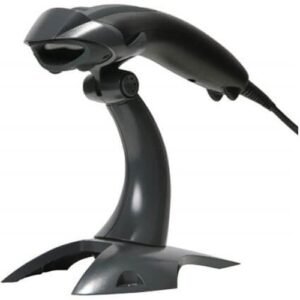
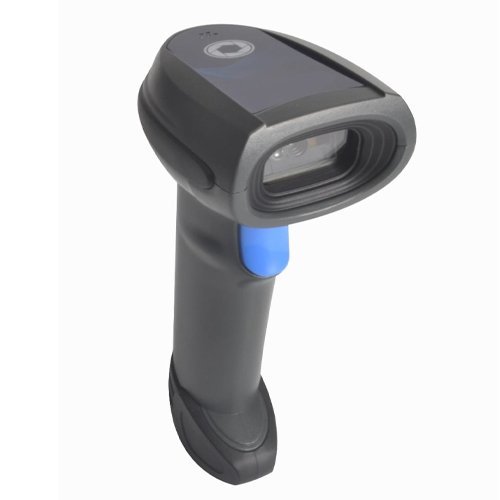
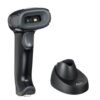
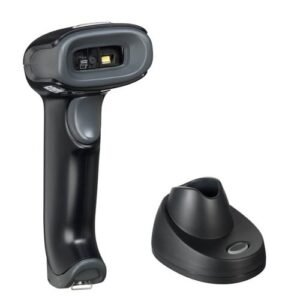
Zahabi ZS-5255WCS 2D Wireless Barcode Scanner
Support double firmware upgrade online: wireless and decoder.
1MP image frame rate up to 60fps
Support OCR (Passport, ID card, driving license card, Visa Card etc.)
3-in-1 transmission: Cradle +BT+Type-B Cable
Can read all 1D/2D/Dotcode barcode on the screen and paper
Support double firmware upgrade online: wireless and decoder.
Support for offline storage mode, can memory 380,000 characters (EAN-13 code)
Zahabi ZS-5255WCS 2D Wireless Barcode Scanner
Q1. What is special about the Zahabi ZS‑5255WCS 2D wireless barcode scanner?
The ZS‑5255WCS is a 2D wireless scanner bundle designed for fixed POS counters, typically including a charging cradle or stand for easy docking. It combines cordless flexibility with a stable, professional setup at cashier stations and service counters.
Q2. Is the ZS‑5255WCS suitable for hands‑free scanning at the counter?
Yes, with its stand or cradle, the ZS‑5255WCS can be used in presentation or hands‑free mode at the POS, allowing staff to quickly pass items in front of the scanner. Operators can also lift it from the stand and use it as a handheld scanner when needed.
Q3. Which barcode types does the ZS‑5255WCS support?
It supports both 1D and 2D symbologies, including UPC/EAN, Code 128, and QR Code, making it suitable for product barcodes, loyalty codes, and digital payment QR codes. This versatility helps future‑proof your POS counter for new marketing and payment formats.
Q4. How does the ZS‑5255WCS connect to my POS terminal?
The scanner communicates wirelessly to a base or USB dongle that connects to your POS terminal, PC, or all‑in‑one POS machine. The host sees it as a standard barcode input device, simplifying integration with most POS software.
Q5. Does the ZS‑5255WCS have enough battery life for busy counters?
Yes, it uses a high‑capacity battery that supports long continuous scanning times typical of retail shifts. Docking it in the cradle between customers helps keep it topped up throughout the day.
Q6. Is the ZS‑5255WCS a good choice for multi‑lane supermarkets in Kuwait?
The combination of wireless operation, 2D decoding, and a neat stand‑based counter setup makes the ZS‑5255WCS a strong choice for multi‑lane grocery and retail stores that want flexible yet organised checkouts.
Counter‑focused configuration and mounting advice
We assess your checkout layout and recommend how to position the ZS‑5255WCS stand or cradle so scanning is fast, ergonomic, and cables remain hidden and safe.
Cradle pairing and host connection assistance
Our team guides you through pairing the scanner with its cradle or dongle, connecting to POS systems, and confirming that data is transmitted correctly into your billing software.
Hands‑free vs handheld workflow optimisation
We help you set up scanning modes and operator routines so staff can switch smoothly between hands‑free presentation scanning and handheld use during peak times.
Battery health and docking best practices
We provide simple guidelines on docking patterns, charging times, and power checks to keep the ZS‑5255WCS battery healthy and avoid unexpected downtime at the counter.
Troubleshooting cradle, stand, and range issues
If you see issues with power, cradle detection, or wireless range, we walk you through checking power connections, dongle placement, and configuration settings to resolve them.
Multi‑lane deployment and spare pool planning
For stores with many lanes, we help you decide how many ZS‑5255WCS units each lane needs, how to label bases and scanners, and how many spare units to maintain per branch.
Q1. What is special about the Zahabi ZS‑5255WCS 2D wireless barcode scanner?
The ZS‑5255WCS is a 2D wireless scanner bundle designed for fixed POS counters, typically including a charging cradle or stand for easy docking. It combines cordless flexibility with a stable, professional setup at cashier stations and service counters.
Q2. Is the ZS‑5255WCS suitable for hands‑free scanning at the counter?
Yes, with its stand or cradle, the ZS‑5255WCS can be used in presentation or hands‑free mode at the POS, allowing staff to quickly pass items in front of the scanner. Operators can also lift it from the stand and use it as a handheld scanner when needed.
Q3. Which barcode types does the ZS‑5255WCS support?
It supports both 1D and 2D symbologies, including UPC/EAN, Code 128, and QR Code, making it suitable for product barcodes, loyalty codes, and digital payment QR codes. This versatility helps future‑proof your POS counter for new marketing and payment formats.
Q4. How does the ZS‑5255WCS connect to my POS terminal?
The scanner communicates wirelessly to a base or USB dongle that connects to your POS terminal, PC, or all‑in‑one POS machine. The host sees it as a standard barcode input device, simplifying integration with most POS software.
Q5. Does the ZS‑5255WCS have enough battery life for busy counters?
Yes, it uses a high‑capacity battery that supports long continuous scanning times typical of retail shifts. Docking it in the cradle between customers helps keep it topped up throughout the day.
Q6. Is the ZS‑5255WCS a good choice for multi‑lane supermarkets in Kuwait?
The combination of wireless operation, 2D decoding, and a neat stand‑based counter setup makes the ZS‑5255WCS a strong choice for multi‑lane grocery and retail stores that want flexible yet organised checkouts.
Counter‑focused configuration and mounting advice
We assess your checkout layout and recommend how to position the ZS‑5255WCS stand or cradle so scanning is fast, ergonomic, and cables remain hidden and safe.
Cradle pairing and host connection assistance
Our team guides you through pairing the scanner with its cradle or dongle, connecting to POS systems, and confirming that data is transmitted correctly into your billing software.
Hands‑free vs handheld workflow optimisation
We help you set up scanning modes and operator routines so staff can switch smoothly between hands‑free presentation scanning and handheld use during peak times.
Battery health and docking best practices
We provide simple guidelines on docking patterns, charging times, and power checks to keep the ZS‑5255WCS battery healthy and avoid unexpected downtime at the counter.
Troubleshooting cradle, stand, and range issues
If you see issues with power, cradle detection, or wireless range, we walk you through checking power connections, dongle placement, and configuration settings to resolve them.
Multi‑lane deployment and spare pool planning
For stores with many lanes, we help you decide how many ZS‑5255WCS units each lane needs, how to label bases and scanners, and how many spare units to maintain per branch.

Related products
Out of stock

Out of stock