Zahabi ZS-5255SWC 2D WIRELESS
BARCODE SCANNER
Q1. What is the Zahabi ZS‑5255SWC 2D wireless barcode scanner designed for?
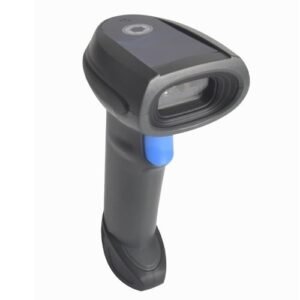
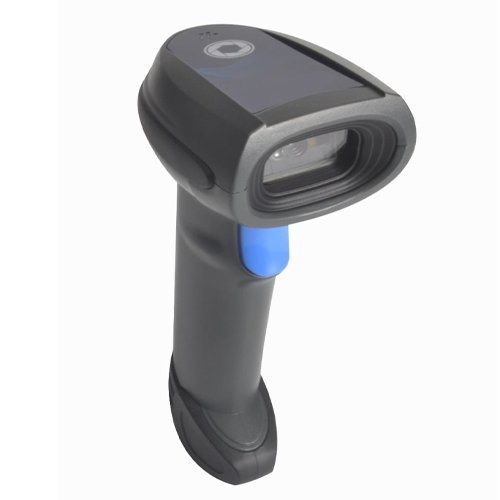
The ZS‑5255SWC is a flexible 2D wireless scanner variant built for businesses that want a single device to handle both POS counter use and light warehouse or back‑store scanning. It is suitable for retail chains, minimarts, and stockrooms across Kuwait.
Q2. How is the SWC model different from other ZS‑5255 wireless variants?
The SWC bundle is typically configured to support both stand‑based counter use and mobile scanning, often including a cradle/stand plus cable and wireless options. It is tailored for “store plus warehouse” style usage where one scanner moves between front‑end and back‑store.
Q3. What connectivity does the ZS‑5255SWC support?
Just like other ZS‑5255 wireless variants, the SWC can support 2.4G wireless with a USB dongle, Bluetooth connectivity, and wired USB operation, giving you flexibility to choose the best mode for each task.
Q4. Which barcode types can the ZS‑5255SWC decode?
The scanner reads standard 1D symbologies and 2D codes such as QR Code and Data Matrix, allowing you to use the same device for product scanning, loyalty programmes, and stock labels.
Q5. Is the ZS‑5255SWC durable enough for daily store and stockroom use?
Yes, it is designed for everyday POS and back‑store use, with a sturdy housing and battery capacity that supports extended scanning sessions when staff move between counters and stock areas.
Q6. Is the ZS‑5255SWC easy to move between the counter and back‑store?
Yes, it can sit in a stand at the counter during busy hours and be taken to the stockroom using wireless mode when you need to check prices or perform quick counts. Switching between these roles only requires changing where the scanner is docked or which host device it connects to.
Front‑end and back‑store workflow assessment
We review how your team works at checkout and in the stockroom, then recommend how the ZS‑5255SWC can best be shared or allocated between these areas for maximum utilisation.
Mode and host profile setup for multiple roles
Our team helps you set up different usage profiles—for example, pairing to a POS terminal at the counter and to a PC or tablet in the stockroom—so switching roles is simple and reliable.
Stand and cradle placement for flexible use
We advise where to place stands or cradles in both front‑of‑store and back‑store areas so the ZS‑5255SWC can be docked and charged conveniently in both locations.
Wireless range and roaming optimisation
We help you test and fine‑tune coverage so the scanner works reliably between shelves, counters, and packing areas, adjusting dongle positions and connection modes if needed.
Troubleshooting multi‑host pairing and switching
If the scanner has difficulty switching between hosts or modes, we walk you through proper pairing sequences and configuration resets to streamline device handover.
Store‑plus‑warehouse deployment planning
For larger stores and chains, we help define how many ZS‑5255SWC devices are needed per site to cover both POS counters and stockrooms, and how to label and manage them for easy tracking and support.
Q1. What is the Zahabi ZS‑5255SWC 2D wireless barcode scanner designed for?
The ZS‑5255SWC is a flexible 2D wireless scanner variant built for businesses that want a single device to handle both POS counter use and light warehouse or back‑store scanning. It is suitable for retail chains, minimarts, and stockrooms across Kuwait.
Q2. How is the SWC model different from other ZS‑5255 wireless variants?
The SWC bundle is typically configured to support both stand‑based counter use and mobile scanning, often including a cradle/stand plus cable and wireless options. It is tailored for “store plus warehouse” style usage where one scanner moves between front‑end and back‑store.
Q3. What connectivity does the ZS‑5255SWC support?
Just like other ZS‑5255 wireless variants, the SWC can support 2.4G wireless with a USB dongle, Bluetooth connectivity, and wired USB operation, giving you flexibility to choose the best mode for each task.
Q4. Which barcode types can the ZS‑5255SWC decode?
The scanner reads standard 1D symbologies and 2D codes such as QR Code and Data Matrix, allowing you to use the same device for product scanning, loyalty programmes, and stock labels.
Q5. Is the ZS‑5255SWC durable enough for daily store and stockroom use?
Yes, it is designed for everyday POS and back‑store use, with a sturdy housing and battery capacity that supports extended scanning sessions when staff move between counters and stock areas.
Q6. Is the ZS‑5255SWC easy to move between the counter and back‑store?
Yes, it can sit in a stand at the counter during busy hours and be taken to the stockroom using wireless mode when you need to check prices or perform quick counts. Switching between these roles only requires changing where the scanner is docked or which host device it connects to.
Front‑end and back‑store workflow assessment
We review how your team works at checkout and in the stockroom, then recommend how the ZS‑5255SWC can best be shared or allocated between these areas for maximum utilisation.
Mode and host profile setup for multiple roles
Our team helps you set up different usage profiles—for example, pairing to a POS terminal at the counter and to a PC or tablet in the stockroom—so switching roles is simple and reliable.
Stand and cradle placement for flexible use
We advise where to place stands or cradles in both front‑of‑store and back‑store areas so the ZS‑5255SWC can be docked and charged conveniently in both locations.
Wireless range and roaming optimisation
We help you test and fine‑tune coverage so the scanner works reliably between shelves, counters, and packing areas, adjusting dongle positions and connection modes if needed.
Troubleshooting multi‑host pairing and switching
If the scanner has difficulty switching between hosts or modes, we walk you through proper pairing sequences and configuration resets to streamline device handover.
Store‑plus‑warehouse deployment planning
For larger stores and chains, we help define how many ZS‑5255SWC devices are needed per site to cover both POS counters and stockrooms, and how to label and manage them for easy tracking and support.