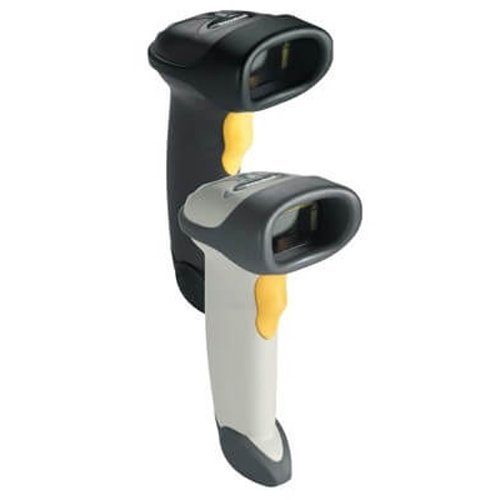
Zebra LS2208 General Purpose Barcode Scanner
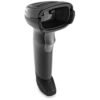
Zebra Handled 1D Barcode scanner, type USB,USB Cable and Stand Included.
 Download Datasheet
Zebra Handled 1D Barcode scanner, type USB,USB Cable and Stand Included.
Q1. What is the Zebra LS2208 barcode scanner used for?
The Zebra LS2208 is a general‑purpose 1D handheld laser barcode scanner for retail checkout, libraries, healthcare, education, and light warehouse tasks. It provides fast, reliable linear barcode scanning at a competitive price point.
Q2. Which barcode types can the LS2208 read?
The LS2208 captures standard 1D and high‑density barcodes, including common symbologies like UPC/EAN, Code 39, Code 128, and more. It is ideal when your business uses only 1D labels and does not yet require 2D codes.
Q3. What is the scanning range of the LS2208?
The LS2208 offers a class‑leading scan range, reading 13‑mil UPC barcodes from contact up to about 17 – 33.8 inches (up to roughly 86 cm) depending on the source spec and conditions. This extended range improves operator comfort and speeds up scanning of items in carts or on shelves.
Q4. Is the LS2208 durable enough for all‑day use?
Yes, the LS2208 is engineered for continuous, heavy daily use and has been tested to withstand multiple 5‑foot (1.5 m) drops to concrete. Its robust, single‑board construction helps maximise uptime and minimise repair costs.
Q5. Can the LS2208 be used in hands‑free mode?
With an optional IntelliStand, the LS2208 supports both handheld and hands‑free presentation scanning. This allows cashiers to switch between modes based on workload and counter layout.
Q6. What interface options and keyboards does the LS2208 support?
The LS2208 supports multiple host interfaces including USB, RS‑232, keyboard wedge, and others, often via a universal cable. It also supports over 90–97 international keyboard layouts, enabling global deployment in diverse environments.
1D scanner requirements and future‑proofing review
Zahabi helps you evaluate whether a 1D‑only LS2208 is sufficient for your current and near‑term needs or if you should consider a 2D model like DS2208 to support QR codes and mobile barcodes.
Interface selection and cabling assistance
You receive guidance on choosing the right host interface (USB, RS‑232, keyboard wedge) and cable type so the LS2208 integrates cleanly with your POS or PC hardware.
Setup, configuration, and IntelliStand usage
Zahabi can provide programming barcodes and instructions for setting beeps, suffixes, and stand‑detection modes so the LS2208 works optimally in both handheld and hands‑free scanning.
Troubleshooting slow or missed reads
If the LS2208 struggles with certain barcodes, support includes checks on label quality, distance, angle, and scanner window condition, as well as configuration resets where necessary.
Lane‑by‑lane deployment planning
For supermarkets, pharmacies, and chain stores, Zahabi helps plan LS2208 allocation per checkout lane or service desk and recommends a sensible number of spare units per site.
Lifecycle and upgrade path management
Zahabi can advise on when and how to upgrade from LS2208 to 2D scanners in the future, while maintaining compatibility and minimising disruption across your POS environment
Q1. What is the Zebra LS2208 barcode scanner used for?
The Zebra LS2208 is a general‑purpose 1D handheld laser barcode scanner for retail checkout, libraries, healthcare, education, and light warehouse tasks. It provides fast, reliable linear barcode scanning at a competitive price point.
Q2. Which barcode types can the LS2208 read?
The LS2208 captures standard 1D and high‑density barcodes, including common symbologies like UPC/EAN, Code 39, Code 128, and more. It is ideal when your business uses only 1D labels and does not yet require 2D codes.
Q3. What is the scanning range of the LS2208?
The LS2208 offers a class‑leading scan range, reading 13‑mil UPC barcodes from contact up to about 17 – 33.8 inches (up to roughly 86 cm) depending on the source spec and conditions. This extended range improves operator comfort and speeds up scanning of items in carts or on shelves.
Q4. Is the LS2208 durable enough for all‑day use?
Yes, the LS2208 is engineered for continuous, heavy daily use and has been tested to withstand multiple 5‑foot (1.5 m) drops to concrete. Its robust, single‑board construction helps maximise uptime and minimise repair costs.
Q5. Can the LS2208 be used in hands‑free mode?
With an optional IntelliStand, the LS2208 supports both handheld and hands‑free presentation scanning. This allows cashiers to switch between modes based on workload and counter layout.
Q6. What interface options and keyboards does the LS2208 support?
The LS2208 supports multiple host interfaces including USB, RS‑232, keyboard wedge, and others, often via a universal cable. It also supports over 90–97 international keyboard layouts, enabling global deployment in diverse environments.
1D scanner requirements and future‑proofing review
Zahabi helps you evaluate whether a 1D‑only LS2208 is sufficient for your current and near‑term needs or if you should consider a 2D model like DS2208 to support QR codes and mobile barcodes.
Interface selection and cabling assistance
You receive guidance on choosing the right host interface (USB, RS‑232, keyboard wedge) and cable type so the LS2208 integrates cleanly with your POS or PC hardware.
Setup, configuration, and IntelliStand usage
Zahabi can provide programming barcodes and instructions for setting beeps, suffixes, and stand‑detection modes so the LS2208 works optimally in both handheld and hands‑free scanning.
Troubleshooting slow or missed reads
If the LS2208 struggles with certain barcodes, support includes checks on label quality, distance, angle, and scanner window condition, as well as configuration resets where necessary.
Lane‑by‑lane deployment planning
For supermarkets, pharmacies, and chain stores, Zahabi helps plan LS2208 allocation per checkout lane or service desk and recommends a sensible number of spare units per site.
Lifecycle and upgrade path management
Zahabi can advise on when and how to upgrade from LS2208 to 2D scanners in the future, while maintaining compatibility and minimising disruption across your POS environment
| 1D/2D | 1D |
|---|---|
| Connectivity | USB |
| Device Type | handheld |