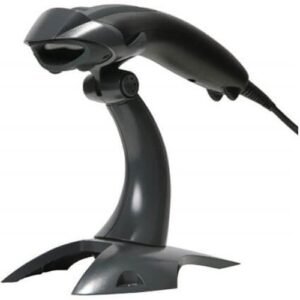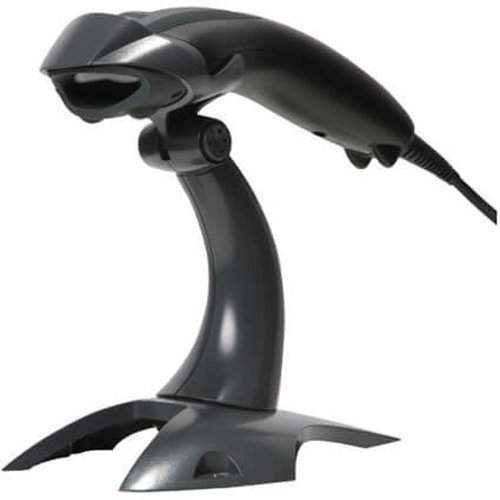
Built on Honeywell’s renowned Voyager™ series, the Voyager 1400g handheld linear scanner provides omnidirectional reading of linear barcodes. It can be cost-effectively upgraded for PDF and 2D barcode scanning at purchase or as needs evolve. Comparable in speed to laser-based scanners, the versatile Voyager 1400g can be tailored to current and future scanning requirements, reducing total ownership costs.
- Precision for All Needs: Decoding barcodes or capturing images, its advanced tech ensures unmatched accuracy.
- Easy Integration, Swift Results: User-friendly design and plug-and-play simplicity mean instant scanning without downtime.
- Comfortable and Durable: Designed for comfort, it lasts long in any work environment.
- Fits Any Industry: From retail to healthcare, it adapts to various industries, enhancing productivity.
- Enhanced Productivity: Choose the Voyager 1400g for reliable scanning that exceeds expectations. Elevate productivity effortlessly.
Product Specification:
- Brand: Honeywell
- Model: Voyager 1400g
- Scanner Type: General Duty
- Supported Barcodes: 1D and 2D Barcodes
- Interface: USB, RS232, Keyboard Wedge
- Dimensions: 180 mm x 66 mm x 43 mm (7.1 in x 2.6 in x 1.7 in)
- Weight: 119g
Q1. What type of scanner is the Honeywell 1400g?
The Honeywell Voyager 1400g is a general‑duty linear / area‑imaging scanner designed for everyday barcode scanning in retail, office and light warehouse environments.
Q2. Can the 1400g read 2D barcodes like QR and Data Matrix?
Depending on the specific configuration, the 1400g can support 2D decoding; many deployments use it primarily for 1D barcodes, but 2D‑capable variants can read QR, PDF417 and Data Matrix codes as well.
Q3. Is the Voyager 1400g suitable for counter‑top POS use?
Yes, its ergonomic pistol‑grip design and reliable scanning performance make it comfortable for cashiers to use throughout a full shift at the checkout counter.
Q4. What connection ports are available on the 1400g?
The 1400g supports common POS interfaces like USB and keyboard wedge, making it easy to connect to PCs, POS terminals and thin clients.
Q5. How tough is the 1400g in daily retail operations?
It is built to withstand multiple drops and routine bumps on the counter, offering dependable service life when handled in typical retail and office environments.
Q6. Can I use the 1400g with basic inventory and stock‑taking software?
Yes, the 1400g sends scanned data like a keyboard, so it works with most Windows inventory tools, spreadsheets and simple stock‑taking apps with minimal setup.
Feature & capability clarification
We help you confirm whether your 1400g unit is 1D‑only or supports 2D barcodes, based on part number and configuration.
POS connection and testing
Our team assists with connecting the 1400g to your POS or PC, verifying that scanned data appears correctly in your billing or inventory software.
Barcode symbology configuration
We guide you through enabling or disabling symbologies so the scanner reads only the barcodes you use in your business.
Basic troubleshooting support
If the 1400g stops scanning or beeps unexpectedly, we help check cables, configuration and barcode quality to get you back up and running.
Upgrade path consultation
If you later need more advanced 2D scanning or wireless mobility, we can recommend compatible upgrade models that fit your environment.
Q1. What type of scanner is the Honeywell 1400g?
The Honeywell Voyager 1400g is a general‑duty linear / area‑imaging scanner designed for everyday barcode scanning in retail, office and light warehouse environments.
Q2. Can the 1400g read 2D barcodes like QR and Data Matrix?
Depending on the specific configuration, the 1400g can support 2D decoding; many deployments use it primarily for 1D barcodes, but 2D‑capable variants can read QR, PDF417 and Data Matrix codes as well.
Q3. Is the Voyager 1400g suitable for counter‑top POS use?
Yes, its ergonomic pistol‑grip design and reliable scanning performance make it comfortable for cashiers to use throughout a full shift at the checkout counter.
Q4. What connection ports are available on the 1400g?
The 1400g supports common POS interfaces like USB and keyboard wedge, making it easy to connect to PCs, POS terminals and thin clients.
Q5. How tough is the 1400g in daily retail operations?
It is built to withstand multiple drops and routine bumps on the counter, offering dependable service life when handled in typical retail and office environments.
Q6. Can I use the 1400g with basic inventory and stock‑taking software?
Yes, the 1400g sends scanned data like a keyboard, so it works with most Windows inventory tools, spreadsheets and simple stock‑taking apps with minimal setup.
Feature & capability clarification
We help you confirm whether your 1400g unit is 1D‑only or supports 2D barcodes, based on part number and configuration.
POS connection and testing
Our team assists with connecting the 1400g to your POS or PC, verifying that scanned data appears correctly in your billing or inventory software.
Barcode symbology configuration
We guide you through enabling or disabling symbologies so the scanner reads only the barcodes you use in your business.
Basic troubleshooting support
If the 1400g stops scanning or beeps unexpectedly, we help check cables, configuration and barcode quality to get you back up and running.
Upgrade path consultation
If you later need more advanced 2D scanning or wireless mobility, we can recommend compatible upgrade models that fit your environment.