
Inventory management depends heavily on fast and accurate data collection. Whether it is a warehouse receiving shipments, a retail store tracking stock, or a logistics company managing deliveries, employees rely on technology to capture information quickly. Two of the most common devices used for this purpose are handheld mobile computers and barcode scanners.
At first glance, these devices may seem similar because both can scan barcodes and help track inventory. However, their capabilities, functionality, and business applications are very different. This is why many businesses compare handheld mobile computer vs barcode scanner solutions before investing in new hardware.
Choosing the wrong device can affect productivity, workflow efficiency, and long-term operating costs. Understanding the differences helps businesses select the right tool for their operational needs. This guide explains both technologies in practical terms and helps you determine which solution fits your environment best.
Key Takeaways:
- Barcode scanners focus primarily on barcode reading.
- Handheld mobile computers combine scanning and computing functions.
- Warehouses often benefit from mobile computing capabilities.
- Device selection depends on workflow complexity.
- Long-term operational needs should guide purchasing decisions.
Understanding the Difference Between a Handheld Mobile Computer and a Barcode Scanner
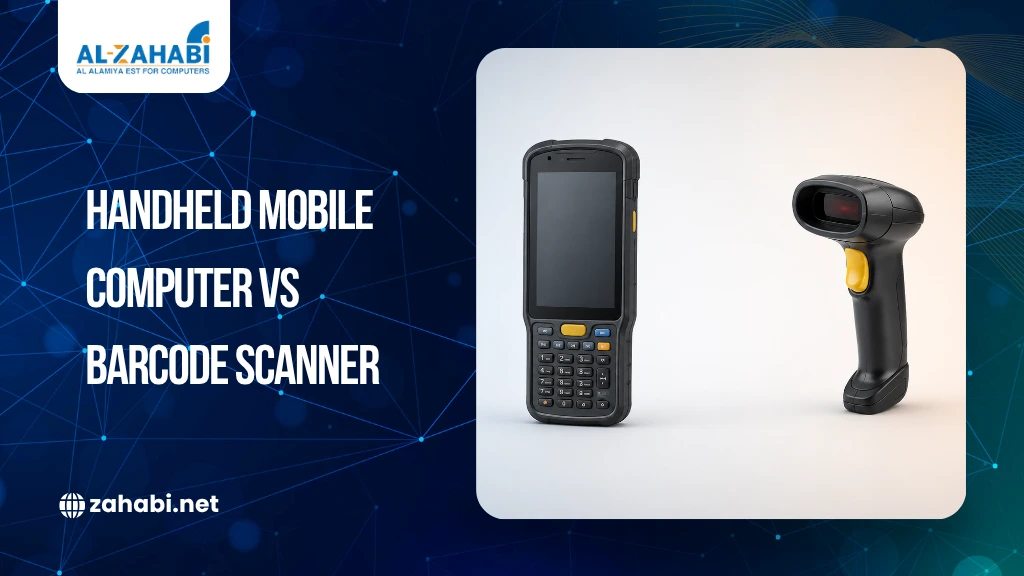
The comparison between a handheld mobile computer vs barcode scanner begins with functionality. A barcode scanner is designed primarily to capture barcode information and transmit it to another device, such as a POS system, computer, or inventory platform.
A handheld mobile computer goes much further. It combines barcode scanning with a built-in operating system, touchscreen interface, wireless connectivity, storage, and application support.
Think of a barcode scanner as a data capture tool and a handheld mobile computer as a portable computer with scanning capabilities. Both devices support inventory management, but they serve different operational requirements.
Core Features Compared
Understanding the core differences helps businesses choose the right solution.
Feature | Barcode Scanner | Handheld Mobile Computer |
Barcode Scanning | Yes | Yes |
Touchscreen Display | No | Yes |
Operating System | No | Yes |
Wireless Connectivity | Limited | Advanced |
Application Support | No | Yes |
Data Storage | Minimal | Built-In |
Real-Time Inventory Access | Limited | Yes |
Device Cost | Lower | Higher |
For simple scanning tasks, barcode scanners are often enough. More advanced workflows usually require mobile computing functionality.
How Barcode Scanners Work in Daily Operations
Barcode scanners are among the most widely used data collection devices in retail, warehousing, healthcare, and logistics. Their primary purpose is straightforward: scan information and transfer it to another system. When an employee scans a barcode, the scanner captures the information and sends it to connected software.
This process works well for:
- Retail checkout counters
- Basic inventory counting
- Product verification
- Point-of-sale systems
- Asset identification
For example, a supermarket cashier scanning products throughout the day typically only needs barcode reading functionality. There is little need for additional computing power. This simplicity is one reason barcode scanners remain popular.
What Makes Handheld Mobile Computers Different
Handheld mobile computers are designed to perform multiple operational tasks from a single device.
In addition to barcode scanning, they support:
- Inventory applications
- Warehouse management software
- Order processing
- Real-time reporting
- Route management
- Data synchronization
Employees can scan products, view inventory levels, update stock records, and communicate with central systems without switching devices.
For example, a warehouse employee picking products can scan inventory, verify stock levels, update order status, and transmit data instantly from a single handheld device.
This makes handheld mobile computers a powerful warehouse mobility solution.
Connectivity and Real-Time Data Access
One of the biggest differences between these devices involves connectivity. Traditional barcode scanners often depend on a connected system.
Data is captured and then transmitted to a host computer or software platform. Handheld mobile computers operate independently.
Most support:
- Wi-Fi
- Bluetooth
- Cellular connectivity
- Cloud applications
This allows workers to access information in real time.
For example, a logistics employee can verify inventory levels while standing in a loading area without returning to a workstation. Real-time access improves decision-making and reduces delays.
Inventory Management Capabilities
Inventory visibility is increasingly important for modern businesses. Barcode scanners help capture inventory data.
Handheld mobile computers help manage inventory data. This difference is significant.
A barcode scanner tells the system what was scanned. A handheld mobile computer allows employees to see inventory levels, product locations, replenishment requirements, and order information immediately. Many businesses rely on accurate barcode labels to ensure inventory data remains consistent across warehouses, retail stores, and distribution operations. Regardless of the device being used, accurate scanning also depends on barcode quality, making factors such as ribbons, labels, and printer resolution important for reliable inventory tracking.
For businesses managing thousands of SKUs, this capability improves efficiency considerably. This is why many warehouses adopt handheld computers as part of a broader inventory scanner strategy.
Warehouse Operations and Device Selection
Barcode Scanners for Basic Warehouse Tasks
Not every warehouse requires advanced mobile computing capabilities. Some operations only need simple scanning functions such as receiving products, checking inventory levels, and confirming outgoing shipments. In these environments, standard barcode scanners are often sufficient to support daily workflows.
Barcode scanners offer several advantages, including lower upfront investment, easier deployment, and minimal training requirements for employees. Because they focus primarily on barcode capture, they are straightforward to use and maintain. Small warehouses and businesses with relatively simple inventory processes often benefit from this simplicity, making barcode scanners a practical and cost-effective solution.
Handheld Mobile Computers for Advanced Warehouse Workflows
Warehouses that process large inventory volumes also depend on durable labels and high-quality barcode ribbons to maintain scanning accuracy throughout daily operations.
Mobile computers are often deployed alongside barcode labeling infrastructure, making barcode printing solutions for warehouses & logistics companies a useful resource for businesses looking to improve end-to-end inventory tracking.
Employees may need access to:
- Inventory databases
- Warehouse management systems
- Picking instructions
- Shipping information
Handheld mobile computers provide all these capabilities.
Many organizations consider them a critical warehouse mobility solution because they reduce dependency on fixed workstations. Workers can move throughout the facility while maintaining access to operational data.
Retail Use Cases
Retail businesses often use both barcode scanners and handheld mobile computers, but each serves a different purpose. Barcode scanners are commonly found at checkout counters because they are fast, easy to use, and cost-effective. For most cashiers, scanning product barcodes and processing transactions does not require advanced computing capabilities.
Handheld mobile computers, however, play a larger role behind the scenes. Retail inventory teams use them for stock checks, inventory counts, shelf audits, and store transfer management. Since these devices provide access to inventory data and business applications, employees can update records and verify stock information directly from the sales floor. For larger retail chains managing multiple locations, handheld mobile computers improve inventory visibility and help maintain better control over stock movement across stores.
Logistics and Distribution Environments
Distribution centers require speed and accuracy. Products move constantly through receiving, storage, picking, and shipping stages. Handheld mobile computers help employees manage these workflows from a single device.
Workers can:
- Scan inventory
- Confirm shipment details
- Update order status
- Access delivery information
Barcode scanners still play a role, but mobile computers often provide greater operational flexibility. This is especially true in large distribution facilities.
Durability Considerations
Industrial environments can be demanding.
Devices may face:
- Dust exposure
- Moisture
- Repeated drops
- Continuous handling
Many handheld mobile computers are designed as rugged devices.
They often include:
- Reinforced housings
- Industrial-grade components
- Extended battery life
- Environmental protection ratings
Barcode scanners are available in rugged versions as well, but standard models may offer less protection. Businesses operating in warehouses or manufacturing facilities should evaluate durability carefully.
Cost Comparison
Cost remains an important consideration. Barcode scanners generally require lower upfront investment.
Their functionality is limited, but they perform scanning tasks efficiently. Handheld mobile computers cost more because they combine multiple technologies into a single device.
Here is a simplified comparison:
Cost Factor | Barcode Scanner | Handheld Mobile Computer |
Initial Cost | Lower | Higher |
Maintenance | Moderate | Moderate |
Functionality | Basic | Advanced |
Software Support | Limited | Extensive |
Long-Term Flexibility | Lower | Higher |
Businesses should consider operational value rather than purchase price alone.
Long-Term Operational Value
When comparing device costs, businesses should look beyond the initial purchase price. A barcode scanner may seem like the more affordable option at first, but operational efficiency also plays a major role in long-term value. In many environments, employees need to switch between scanners, paperwork, computer terminals, and inventory systems to complete daily tasks. This extra movement can slow workflows and increase the chances of errors.
Handheld mobile computers help eliminate many of these inefficiencies by combining scanning, data access, and application functionality into a single device. Workers can scan products, update inventory records, access warehouse management systems, and process information without changing devices. This streamlined workflow saves time, improves accuracy, and supports better productivity. For businesses managing complex warehouse, logistics, or manufacturing operations, the long-term operational benefits often justify the higher initial investment.
Choosing the Right Device for Your Business
1. Evaluate Workflow Complexity
Simple workflows usually require simple tools.
If employees only scan products occasionally, barcode scanners may be enough.
More advanced environments often benefit from mobile computing functionality.
2. Consider Mobility Requirements
Workers constantly moving through warehouses or distribution centers often need immediate access to information.
Handheld mobile computers support this requirement effectively.
Fixed workflows may not require advanced mobility.
3. Review Software Integration Needs
Many businesses rely on:
- Warehouse management systems
- ERP platforms
- Inventory software
Handheld mobile computers integrate more easily with these systems.
This improves operational visibility.
4. Assess Future Growth
Businesses should consider future requirements rather than current needs alone.
A device that works today may become limiting as operations expand.
Scalability is an important factor in purchasing decisions.
Real Business Examples
A small retail store may use barcode scanners successfully because inventory checks are relatively simple and checkout processing remains the primary requirement.
Now consider a large distribution center processing thousands of shipments every day. Employees need access to inventory information, order status, product locations, and shipping details while moving through the warehouse.
In this environment, handheld mobile computers become more practical because they combine scanning and computing capabilities in a single device.
Manufacturing facilities provide another example. Workers often need to capture production data while accessing inventory records simultaneously. These environments also commonly use industrial printers to produce durable labels for inventory tracking, asset management, and production workflows. Mobile computers simplify these workflows significantly. Different operational environments require different solutions.
Organizations evaluating warehouse labeling equipment can also explore desktop vs industrial barcode printers: which one fits your use case to determine which printer category best supports their operational requirements.
Conclusion
The choice between a handheld mobile computer vs barcode scanner depends largely on operational requirements. Barcode scanners remain effective for simple scanning tasks, retail checkouts, and low-complexity workflows. Handheld mobile computers provide greater flexibility, real-time data access, and advanced workflow support for warehouses, logistics operations, and manufacturing environments. Businesses should evaluate mobility needs, software requirements, and future growth plans before making a decision.
FAQs
1. What is the main difference between a handheld mobile computer vs. a barcode scanner?
A barcode scanner primarily captures barcode information, while a handheld mobile computer combines barcode scanning with computing, connectivity, and application support.
2. Which device is better for warehouse inventory management?
Handheld mobile computers are often better for warehouses because they provide real-time inventory access, data synchronization, and workflow management capabilities.
3. Can a handheld mobile computer replace a barcode scanner?
Yes. Most handheld mobile computers include barcode scanning functionality while offering additional features such as inventory applications and wireless connectivity.
4. Are handheld mobile computers more expensive?
Generally, yes. They cost more because they combine scanning technology, computing power, software support, and communication capabilities.
5. Which industries use handheld mobile computers most?
Warehousing, logistics, manufacturing, transportation, and distribution operations commonly use handheld mobile computers to improve mobility and operational efficiency.




Add comment