
- Barcode Printing Solution
- Biometrics Attendance System
- Camera
- Document Scanner
- ID Cards
- Kiosk
- Mobile Computer
- POS Accessories
- POS Machines
- Price Checker Kios
- Printing Supplies
- RECEIPT PRINTER
- RFID & Hardware Solutions
- Tablet
- Uncategorized
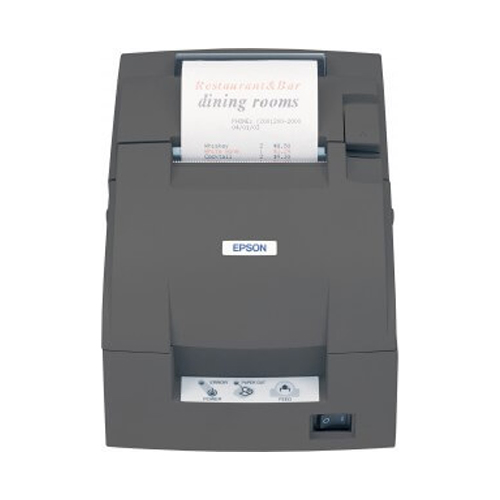
Epson TM-U220B USB Kitchen Printer POS Machine
Epson TM-U220B USB Kitchen Printer POS Machine
They are designed to work right out of the box with mobile POS applications and can print directly from iOS, Android and Windows devices.
Product Details
Q1. What is a kitchen printer and why do I need one in my restaurant?
A kitchen printer (KOT printer) is a dedicated device used in the back‑of‑house to print order tickets for chefs and kitchen staff, separate from front‑office customer receipts, improving accuracy and speed of food preparation.
Q2. Is this kitchen printer thermal or impact type?
Zahabi offers both thermal and impact kitchen printers; impact models are preferred in hot, steamy environments, while thermal models are quieter and faster in controlled conditions.
Q3. How does the POS send orders to the kitchen printer?
Your POS routes kitchen items to the KOT printer via LAN, USB or serial connection, based on printer mapping rules set in the POS software.
Q4. Can the kitchen printer support multiple language printing (Arabic/English)?
Yes, with proper font and POS configuration, kitchen tickets can be printed in Arabic, English or bilingual formats.
Q5. Can I have separate kitchen printers for different stations (grill, salad, bar)?
Most restaurant POS systems can route menu items to different KOT printers, so you can deploy multiple kitchen printers in different preparation areas.
Q6. Is the kitchen printer loud enough for chefs to notice new orders?
Impact KOT printers are naturally louder, while thermal units can use buzzers or indicators; we can recommend the right model for your environment.
Choosing the right kitchen printer technology
We help you decide between thermal and impact kitchen printers based on heat, humidity and ticket requirements.
POS routing and station setup
Our team works with your POS configuration to route specific menu items to the correct kitchen printers.
Paper, ribbon and environment recommendations
We advise on paper type, ribbon (for impact models) and placement away from extreme heat or steam.
Ticket layout & readability
We help you design ticket formats that are easy for chefs to read and prioritize during rush periods.
Scale‑up planning for multi‑kitchen operations
We support planning additional KOT printers as your restaurant adds new stations or branches.
Tech Specs
Rating & Reviews
How We Can Help You

Wide Selection, Better Choices
Find products that match your exact needs without compromise.

Built for Performance
High-quality materials and tested reliability you can depend on.

Smartly Curated
Only the best products make it to our platform, saving you time and effort.

Customer-First Approach
Trusted by shoppers who value quality, service, and consistency.

Drivers, Manuals & Support
Zahabi Support
From drivers and manuals to diagnostic tools and replacement parts, Zahabi Product Support has you covered!
You may add any content here from XStore Control Panel->Sales booster->Request a quote->Ask a question notification
At sem a enim eu vulputate nullam convallis Iaculis vitae odio faucibus adipiscing urna.