
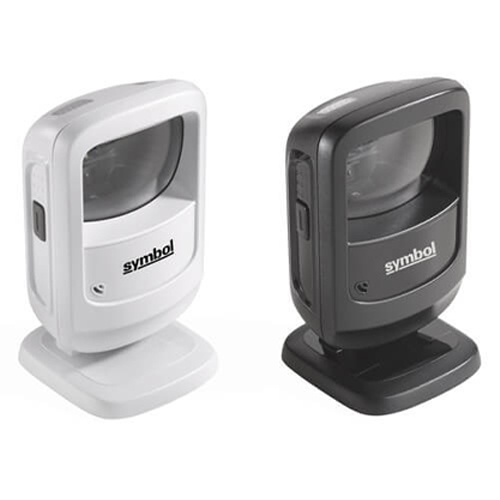
The Zebra DS9208 is a hands-free barcode scanner designed for the modern mobile world, offering affordable next-generation scanning technology. Whether scanning barcodes from paper labels or mobile barcodes displayed on the screen of a smartphone, the DS9208 provides unparalleled versatility. From 1D to 2D barcodes, the DS9208 excels in various applications, including retail, where it identifies products, prices at the cash register, coupons, mobile tickets, and more.

Q1. What is the Zebra DS9208 barcode scanner used for?
The Zebra DS9208 is an omnidirectional, hands‑free presentation scanner designed for retail POS, pharmacies, labs, and reception desks. It scans both 1D and 2D barcodes from printed labels and electronic screens without needing precise alignment.
Q2. Which barcode types does the DS9208 support?
The DS9208 reads 1D, 2D, and PDF417 barcodes, covering retail product codes, loyalty and membership cards, tickets, and QR‑based promotions. This allows a single compact scanner to handle a wide variety of codes at the counter.
Q3. Can the DS9208 scan barcodes from phones and tablets?
Yes, it is designed to scan barcodes displayed on mobile phones, tablets, and computer screens as well as those printed on paper and labels. This makes it ideal for e‑wallets, mobile coupons, and app‑based loyalty programmes.
Q4. Is the DS9208 only hands‑free, or can it be used as a handheld scanner?
The DS9208 supports both hands‑free presentation mode and handheld mode. Staff can simply pick up the scanner when needed for larger or awkward items and then return it to its stand for normal hands‑free operation.
Q5. Is the DS9208 compact enough for small checkout counters?
Yes, the DS9208 has a “fit‑anywhere” compact footprint designed for space‑constrained environments and design‑conscious retail counters. Its sleek form factor helps keep POS areas tidy while still providing high‑performance scanning.
Q6. How durable is the DS9208 for daily use?
The DS9208 is rated to withstand drops of around 1.5 m and is built for everyday POS duty. Its spherical exit window and imaging design help maintain performance in demanding retail and service environments.
Presentation scanner fit and counter layout review
Zahabi reviews your checkout or front‑desk layout and workload to confirm how many DS9208 units you need and where to place them for maximum throughput and operator comfort.
Installation, cabling, and host configuration
You get guidance on connecting the DS9208 to POS terminals or PCs, selecting the appropriate interface (USB, keyboard wedge, etc.), and applying config barcodes so it integrates cleanly with your POS software.
Optimization for mixed printed and digital scanning
Zahabi helps tune angle, working distance, and beeper/LED settings so the DS9208 can quickly read both printed labels and on‑screen QR codes in real‑world lighting conditions.
Troubleshooting performance and window issues
If you see missed scans, reflections, or performance drops, Zahabi will walk you through cleaning the spherical window, checking ambient light, and adjusting settings to restore strong omnidirectional scanning.
Workflow design for hands‑free plus handheld use
Support includes advice on when to rely on pure presentation mode versus picking up the scanner, helping cashiers and reception staff work faster with fewer repetitive movements.
Multi‑store deployment and spare strategy
For chains and clinics, Zahabi can standardise DS9208 configurations, label devices per station, and recommend spare‑unit levels so every counter in every branch maintains scanning capability.

Find products that match your exact needs without compromise.

High-quality materials and tested reliability you can depend on.

Only the best products make it to our platform, saving you time and effort.

Trusted by shoppers who value quality, service, and consistency.

From drivers and manuals to diagnostic tools and replacement parts, Zahabi Product Support has you covered!
At sem a enim eu vulputate nullam convallis Iaculis vitae odio faucibus adipiscing urna.