
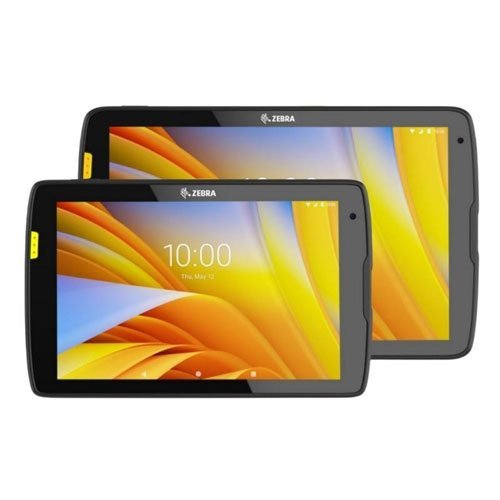
Zebra ET40 Wi-Fi Only Android Rugged Tablet
If you work in more demanding environments, no problem — just add the optional rugged boot for even more durability.
The ET40 and ET45 are built for business from the inside out, delivering reliable operation you can count on. Drop it on tile or concrete floors. Use it inside and outside, even in the heat or subzero temperatures. Hose it off. It still works. And if you work in more demanding environments, no problem — just add the optional rugged boot for even more durability.
The ET40 and ET45 are built for business from the inside out, delivering reliable operation you can count on. Drop it on tile or concrete floors. Use it inside and outside, even in the heat or subzero temperatures. Hose it off. It still works. And if you work in more demanding environments, no problem — just add the optional rugged boot for even more durability.
Fastest wireless connectivity to keep you connected anywhere
Get the fastest Wi-Fi and cellular speeds with Wi-Fi 6 and 5G. The Wi-Fi only ET40 is ideal indoors in retail and hospitality, while the Wi-Fi and cellular ET45 is ideal for delivery drivers and more out in the field. Connect cordless headsets, printers and more with Bluetooth to create a complete wireless solution.
Multi-shift battery power
Power options keep your tablets up and running over multiple shifts, while Zebra’s PowerPrecision batteries provide the intelligence to better manage your battery pool. Get constant power with an optional hot-swappable secondary battery — ideal for multiple shifts.
World-class integrated scanning
No matter what type of scanning your workers do, there’s a Zebra scan engine that’s right for the job — from standard range scanning to a large ‘sweet spot’ for dependable point-and-shoot’ simplicity or an advanced range scanner to capture items in hand and across the room. And all scanners deliver the performance that has made Zebra the market leader — split-second first time capture of virtually every barcode, in practically any condition.
Q1. What sets the Zebra ET40 rugged tablet apart from TC handheld mobile computers?
The Zebra ET40 is a rugged 8‑inch (or larger, depending on configuration) Android tablet with Wi‑Fi connectivity, designed for applications needing more screen space like detailed inventory views, dashboards, and service documentation. TC handhelds are smaller and optimized for one‑handed scanning and high mobility in tight spaces.
Q2. Does the Zebra ET40 support barcode scanning and data capture?
Yes, the ET40 can be paired with optional barcode scanning sleds or Bluetooth scanners, and supports NFC and camera‑based scanning for basic use cases. This makes it suitable for inventory counting, asset tracking, and line‑of‑business applications needing larger UI layouts.
Q3. What operating system and apps run on the Zebra ET40?
ET40 runs enterprise Android and supports WMS, field service, asset management, inspection, and workflow apps designed for rugged tablets. It also benefits from Zebra’s software tools for manageability and long‑term OS support.
Q4. Can the Zebra ET40 be used for operations dashboards and documentation?
Yes, ET40 is ideal for supervisors and field technicians who need to view complex dashboards, floor plans, or digital forms while still accessing scanning functions via attachments or paired scanners.
Q5. What is the battery life and charging options for Zebra ET40?
ET40 is designed for extended use with high‑capacity batteries and optional hot‑swap or secondary battery accessories depending on configuration. Charging options include tablet docks, vehicle mounts, and multi‑slot cradles to support shared use or shift‑based work.
Q6. Does the Zebra ET40 support MDM and enterprise security?
Yes, the ET40 integrates with standard MDM platforms and Android enterprise, enabling device enrollment, application control, encryption, and secure Wi‑Fi management in corporate environments.
Tablet vs Handheld Device Selection
Analysis of your workflows (supervisor dashboards, inspection forms, inventory audits) to confirm whether ET40 tablets or TC handhelds better meet user needs and ergonomics.
Accessory and Mounting Solutions for ET40
Recommendations for protective cases, rugged frames, scanning sleds, desktop and vehicle docks, and keyboard attachments tailored to ET40.
Android Configuration and App Deployment on ET40
Setup of Wi‑Fi networks, user profiles, and installation of WMS, asset management, or field service apps, validated on ET40’s larger display.
ET40 MDM and Security Policy Implementation
Enrollment into your MDM, configuration of security policies, app catalogs, and kiosk modes suitable for shared tablet use.
Deployment and Training for ET40 Users
Rollout planning for ET40 fleets, configuration templates, and end‑user training focused on tablet‑based workflows and accessories.
Q1. What sets the Zebra ET40 rugged tablet apart from TC handheld mobile computers?
The Zebra ET40 is a rugged 8‑inch (or larger, depending on configuration) Android tablet with Wi‑Fi connectivity, designed for applications needing more screen space like detailed inventory views, dashboards, and service documentation. TC handhelds are smaller and optimized for one‑handed scanning and high mobility in tight spaces.
Q2. Does the Zebra ET40 support barcode scanning and data capture?
Yes, the ET40 can be paired with optional barcode scanning sleds or Bluetooth scanners, and supports NFC and camera‑based scanning for basic use cases. This makes it suitable for inventory counting, asset tracking, and line‑of‑business applications needing larger UI layouts.
Q3. What operating system and apps run on the Zebra ET40?
ET40 runs enterprise Android and supports WMS, field service, asset management, inspection, and workflow apps designed for rugged tablets. It also benefits from Zebra’s software tools for manageability and long‑term OS support.
Q4. Can the Zebra ET40 be used for operations dashboards and documentation?
Yes, ET40 is ideal for supervisors and field technicians who need to view complex dashboards, floor plans, or digital forms while still accessing scanning functions via attachments or paired scanners.
Q5. What is the battery life and charging options for Zebra ET40?
ET40 is designed for extended use with high‑capacity batteries and optional hot‑swap or secondary battery accessories depending on configuration. Charging options include tablet docks, vehicle mounts, and multi‑slot cradles to support shared use or shift‑based work.
Q6. Does the Zebra ET40 support MDM and enterprise security?
Yes, the ET40 integrates with standard MDM platforms and Android enterprise, enabling device enrollment, application control, encryption, and secure Wi‑Fi management in corporate environments.
Tablet vs Handheld Device Selection
Analysis of your workflows (supervisor dashboards, inspection forms, inventory audits) to confirm whether ET40 tablets or TC handhelds better meet user needs and ergonomics.
Accessory and Mounting Solutions for ET40
Recommendations for protective cases, rugged frames, scanning sleds, desktop and vehicle docks, and keyboard attachments tailored to ET40.
Android Configuration and App Deployment on ET40
Setup of Wi‑Fi networks, user profiles, and installation of WMS, asset management, or field service apps, validated on ET40’s larger display.
ET40 MDM and Security Policy Implementation
Enrollment into your MDM, configuration of security policies, app catalogs, and kiosk modes suitable for shared tablet use.
Deployment and Training for ET40 Users
Rollout planning for ET40 fleets, configuration templates, and end‑user training focused on tablet‑based workflows and accessories.
Reviews
There are no reviews yet.