
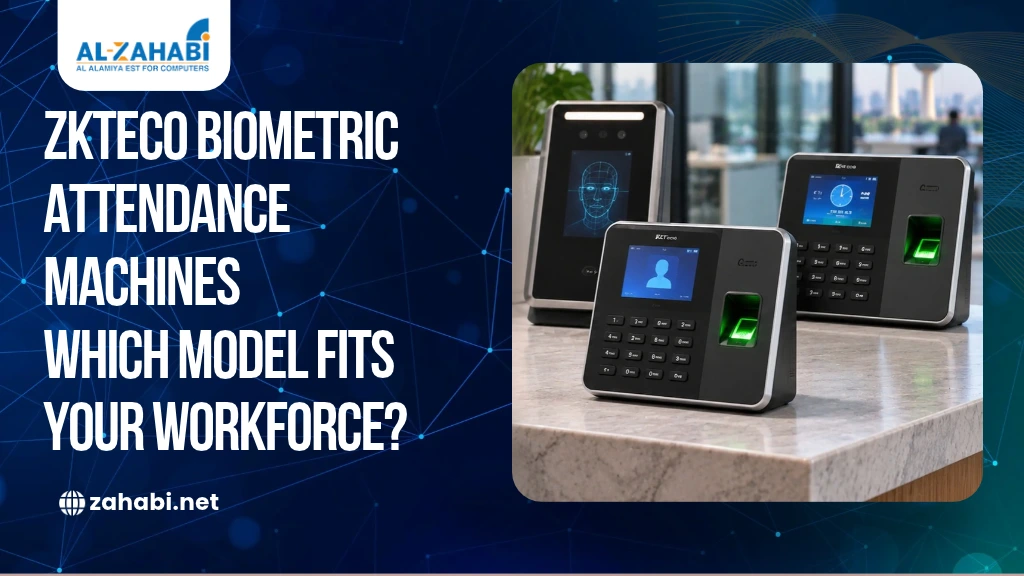
A biometric attendance machine that works for a 20-person office may not be suitable for a workplace with 100 employees arriving within the same 15-minute window. You need enough user capacity to enrol everyone, sufficient log capacity to retain attendance records, and verification speed that does not create queues at the entrance. Software, payroll integration and network connectivity also affect how useful the system will be after installation.
If you are comparing the biometric attendance machine price in Kuwait, the first step is to match the device to your headcount and daily attendance pattern. ZKTeco offers fingerprint, face-recognition and multi-biometric options, each with different capabilities. To understand which method suits your workplace, compare face recognition and fingerprint attendance systems for businesses.
This guide compares selected ZKTeco models listed in our catalogue, explains the capacities that matter, and shows what to confirm before requesting a quotation. Prices are quote-based because the final cost depends on the selected model and project requirements.
Key Takeaways:
- Choose capacity based on enrolled users and daily attendance logs.
- Verification speed matters when many employees arrive together.
- ZKTeco models differ in fingerprint, face and multi-biometric options.
- Software, payroll integration and installation affect the total project cost.
- Request a quotation for the exact model and configuration you need.
What Determines the Biometric Attendance Machine Price in Kuwait?
The biometric attendance machine price in Kuwait is influenced by more than the number of employees a device can register. A basic fingerprint terminal and a multi-biometric face-recognition system serve different requirements, so comparing them only by price can lead to the wrong purchase.
Before choosing a model, consider these specifications:
- User capacity: The number of employees or user profiles the device can enrol.
- Fingerprint capacity: How many fingerprint templates it can store.
- Face capacity: How many facial templates it can store.
- Log capacity: How many attendance transactions it can retain.
- Verification speed: How quickly the device can identify an employee.
- Connectivity: Whether it supports TCP/IP, Wi-Fi or other communication options.
- Power backup: Whether battery backup is built in or available as an option.
- Software: Whether you need cloud-based or on-premise attendance management.
A device may support thousands of biometric templates but have a different transaction limit. These figures should never be treated as interchangeable. Ask the supplier for the official datasheet of the exact model and variant being quoted.
Headcount-to-Device Selection Guide
Use this table as an initial shortlist, not as a rule that one model automatically fits every organisation of a particular size. The final choice depends on the number of entry points, arrival patterns, verification methods and reporting requirements.
Employee headcount | Recommended type to assess | Capacity to look for |
Up to 50 | Fingerprint attendance terminal | At least 50 enrolled users, with sufficient fingerprint templates and log storage |
51–100 | Fingerprint or face-recognition terminal | Capacity above the current headcount, with enough logs for shifts and daily check-ins |
101–300 | Higher-capacity fingerprint or face terminal | Multiple templates per employee where required, and sufficient transaction storage |
301–500 | Face or multi-biometric terminal; consider multiple devices | Capacity for workforce growth and peak-time verification |
More than 500 | Multi-device attendance system with centralised software | Combined device capacity, central reporting and network management |
For example, an office with 100 employees may need only one terminal if staff arrive throughout the day. A factory with the same headcount may need multiple terminals if most employees enter during one shift change. Headcount tells you how many people to enrol; arrival volume helps determine how many devices you need.
ZKTeco Models Available to Explore at Zahabi
Zahabi’s biometric attendance catalogue includes fingerprint, face-recognition and multi-biometric devices. The following models are useful starting points because their product pages or datasheets provide identifiable specifications. Actual availability and supplied configuration should be confirmed before quotation.
1. ZKTeco BioPro SA40 – Fingerprint Attendance
The ZKTeco BioPro SA40 is a fingerprint attendance and access-control terminal. Zahabi’s product information lists a BioID fingerprint sensor, TCP/IP, Wi-Fi, USB connectivity and a 30,000-transaction capacity. Its product details also mention integration options for an existing HR system.
The manufacturer specifications published by a Kuwait distributor list 3,000 fingerprints, 5,000 optional cards and 30,000 transactions.
Consider it when: you need fingerprint-based attendance with network connectivity and may want to connect the terminal to an access-control setup.
2. ZKTeco UA860 – Fingerprint Attendance with Wi-Fi
The UA860 is another fingerprint option listed in Zahabi’s product documentation. Its datasheet specifies:
- 3,000 user profiles
- 1,000 fingerprint templates
- 50,000 attendance records
- TCP/IP, Wi-Fi and USB Host
- Optional ID/MIFARE card support
- Third-party electric lock and exit-button interfaces
The distinction between 3,000 users and 1,000 fingerprint templates matters. If every employee needs fingerprint verification, check whether the template capacity matches your enrolment requirements.
Consider it when: your workplace needs a network-connected fingerprint device and you want to compare its record capacity with your attendance volume.
3. ZKTeco iFace950 – Multi-Biometric Attendance
The iFace950 is a multi-biometric time and attendance terminal supporting face and fingerprint verification.
Its datasheet specifies 3,000 face templates, 4,000 fingerprint templates, 10,000 optional ID cards and 100,000 logs. It supports TCP/IP, RS232/485 and USB Host. Wi-Fi and a 2,000 mAh backup battery are optional functions, rather than features to assume are included in every unit.
Consider it when: you want to offer employees more than one verification method and need a larger attendance-log capacity.
4. ZKTeco SpeedFace-V5L – Face, Fingerprint and Palm Options
The SpeedFace-V5L is a higher-capacity option for organisations evaluating face-based or multi-biometric verification.
The SpeedFace-V5L[P] datasheet available through Zahabi specifies:
Specification | Capacity or feature |
Face capacity | 6,000 |
Fingerprint capacity | 6,000 standard; 10,000 optional |
Palm capacity | 3,000 |
Card capacity | 10,000 |
Transaction capacity | 200,000 |
Facial verification speed | Up to 1 second |
Communication | TCP/IP; Wi-Fi optional |
The datasheet also lists access-control interfaces for an electric lock, door sensor, exit button and alarm. These figures relate specifically to the documented V5L[P] variant, so confirm the model suffix and fitted modules when ordering.
Consider it when: you have a larger workforce, want multiple verification options, or need to evaluate a terminal with higher transaction storage.
5. ZKTeco Horus E1-FP and BioFace D1
Zahabi also lists the Horus E1-FP and BioFace D1 in its biometric attendance catalogue. The Horus E1-FP listing describes face recognition with fingerprint support, while the BioFace D1 is presented as a multi-biometric access terminal with face, fingerprint and card functions.
These are worth discussing with the supplier if you need a portable or multi-method solution. Ask for the exact datasheet, capacity, battery configuration and software compatibility before comparing either model with the SA40, iFace950 or SpeedFace-V5L.
Verification Speed and Peak-Time Attendance
A device’s stored-user capacity does not tell you how quickly employees can complete attendance.
Consider a company with 100 employees who begin their shift at 8:00 AM. If most arrive within a short period, even a terminal with enough fingerprint templates may create a queue.
Verification speed, employee positioning, sensor condition and the number of terminals all affect the experience. The SpeedFace-V5L[P] datasheet specifies facial verification of up to one second, while the iFace950 datasheet describes its verification as high speed without giving the same numerical figure. Avoid comparing these claims as if they were measured under identical conditions.
For busy entrances, ask for a live demonstration using the intended verification method. You can also discuss whether multiple devices are needed to distribute employee traffic.
Software: Cloud vs On-Premise Attendance Management
Attendance software determines how employee records are stored, accessed and managed. The choice between cloud-based and on-premise solutions depends on your organisation’s branch structure, IT infrastructure, data-management preferences and reporting requirements.
Cloud-Based Software
Cloud-based attendance management can allow authorised administrators to access attendance information through a web portal or mobile application. This can be particularly useful when managing biometric attendance systems across multiple business branches in Kuwait. If the attendance platform is hosted by a third-party technology provider, ask where employee records and biometric templates are processed and stored. , where centralised reporting and remote access may be required. It may suit organisations that manage more than one location or need remote access.
Before selecting it, ask about subscription fees, hosting location, data access, backups, security controls and internet dependency.
On-Premise Software
On-premise software is installed within the organisation’s own IT environment. It may suit businesses that prefer to manage their attendance database and access controls internally.
Ask about server requirements, maintenance, backups, software updates and the availability of remote access.
Payroll Integration
If HR currently exports attendance reports into payroll software, check whether the proposed system can provide the required data format or API integration. Confirm how it handles overtime, late arrivals, shift changes and approved leave.
Do not assume that a device automatically integrates with every payroll platform simply because it supports TCP/IP.
Connectivity, Battery Backup and Access-Control Requirements
The connectivity options determine how the terminal communicates with your attendance system.
TCP/IP is useful for connecting a device to a local network. Wi-Fi may reduce the need for a network cable, but it is optional on some models. Check the exact datasheet rather than assuming wireless connectivity is standard.
Battery backup also varies. The iFace950 datasheet lists a 2,000 mAh backup battery as an optional function, while the UA860 datasheet does not list an internal backup battery as a standard specification. Confirm whether backup power is included or needs a separate solution.
If the attendance machine will operate a door, check its access-control relay or supported access-control interface, along with compatibility with the electric lock, door sensor and exit button. The F18 and SpeedFace product specifications illustrate how these interfaces can vary by model.
If your setup also involves issuing employee credentials, understanding the differences between PVC and smart ID cards can help you assess card and access-control compatibility.
Are There Rules for Storing Employee Biometric Data in Kuwait?
Biometric attendance systems process information that can identify employees. Before implementation, your organisation should establish who controls the data, where it is stored, who can access it and how long it is retained.
Kuwait’s Communication and Information Technology Regulatory Authority (CITRA) has issued a Data Privacy Protection Regulation, Decision No. 26 of 2024. However, it is important not to describe this as a blanket biometric-data law applying automatically to every employer. Legal commentary identifies its scope as covering telecommunications and information technology service providers licensed by CITRA. Its application to a particular employer or service arrangement needs to be assessed against the actual roles and processing involved.
If your attendance platform is hosted by a third-party technology provider, ask where employee records and biometric templates are processed and stored. Have your legal or data-protection adviser assess the applicable obligations before collecting employee biometric information.
Useful procurement questions include:
- Does the system store biometric templates locally or on a server?
- Can access to employee records be restricted by administrator role?
- What backup and deletion controls are available?
- Does the software provider process or transfer data outside Kuwait?
- What happens to records when an employee leaves?
CITRA’s regulations and Kuwait’s official legislation resources should be checked directly before making a legal compliance decision.
Installation, Warranty and the Final Quotation
The purchase price is only one part of an attendance-system project. If your project also involves employee identification cards, review this guide to a complete office ID badge system setup in Kuwait to understand the additional equipment required.
Before placing an order, ask Zahabi to confirm:
- The exact ZKTeco model and variant.
- User, fingerprint and face capacity.
- Maximum log capacity.
- Verification speed stated in the datasheet.
- TCP/IP and Wi-Fi availability.
- Battery backup, if required.
- Cloud or on-premise software and licensing.
- Payroll integration requirements.
- Access-control relay and door hardware compatibility.
- Installation scope, warranty period and after-sales support.
A useful quotation should separate the hardware cost from software, installation, accessories and ongoing charges. This makes it easier to compare two configurations without overlooking additional expenses.
Conclusion
The right biometric attendance machine depends on your employee headcount, verification speed, log capacity and HR reporting requirements. A fingerprint terminal may suit a smaller office, while a multi-biometric device can be worth evaluating for a larger workforce or more complex entry setup. Compare the official ZKTeco datasheets, software requirements, installation scope and warranty before requesting a final quotation from Zahabi.
Frequently Asked Questions
1. Which attendance machine suits 100 employees?
For 100 employees, consider a fingerprint or face-recognition terminal with capacity above your current enrolment requirement and enough log storage for daily shifts. A ZKTeco SA40 or UA860 may be worth comparing for fingerprint use, while iFace950 offers face and fingerprint options. Check peak arrival volume too.
2. Does a biometric attendance machine need software or a subscription?
A terminal can record attendance, but software is generally needed to organise shifts, calculate working hours and prepare HR reports. Some software is licensed, while cloud services may involve subscriptions. Confirm the supported edition, employee limits, payroll integration and ongoing charges before purchasing.
3. Are there rules on storing employee biometric data in Kuwait?
Kuwait has CITRA’s Data Privacy Protection Regulation, Decision No. 26 of 2024. Its scope is not automatically a blanket rule for every employer. Applicability depends on the organisations and service providers involved, so obtain legal advice before collecting or storing employee biometric information.
4. What is the difference between user capacity and log capacity?
User capacity refers to the number of employee profiles a terminal can enrol. Fingerprint and face capacities specify how many biometric templates it stores. Log capacity refers to recorded attendance transactions. A device may support many users but still needs sufficient storage for daily check-ins and check-outs.
