
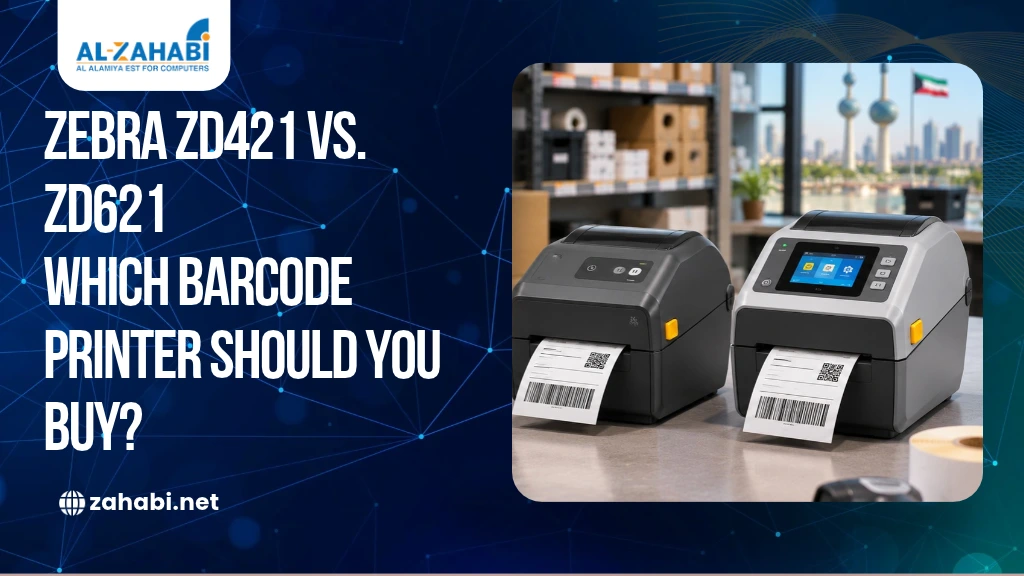
Choosing a desktop barcode printer involves more than comparing prices. You need to consider print speed, label dimensions, ribbon capacity, connectivity and the number of labels your team prints each day. A printer that works well for a small retail counter may not be suitable for a warehouse handling frequent dispatches or product identification tasks.
The Zebra ZD421 vs ZD621 comparison is particularly relevant if you need a compact 4-inch desktop printer for retail, inventory, shipping or asset labelling. If you are still comparing printing technologies, explore the differences between thermal and inkjet barcode printers before selecting a model. However, the ZD621 provides higher maximum print speeds and additional interface and configuration options. Understanding these differences will help you choose the right printer for your business in Kuwait without paying for features your workflow does not require.
Key Takeaways:
- ZD621 offers higher maximum print speeds than ZD421.
- Both models are available in 203 and 300 dpi configurations.
- ZD421 includes a ribbon cartridge option; ZD621 uses ribbon rolls.
- Both support Link-OS, with connectivity options varying by configuration.
- Choose according to daily workload, media requirements and future expansion.
Zebra ZD421 vs ZD621: Specification Comparison
The ZD421 belongs to Zebra’s ZD400 Series, while the ZD621 is part of the ZD600 Series. Both are 4-inch desktop barcode printers available in direct thermal and thermal transfer versions.
The following table compares their main specifications using Zebra’s published technical documentation.
Specification | Zebra ZD421 | Zebra ZD621 |
Print technology | Direct thermal and thermal transfer | Direct thermal and thermal transfer |
Print speed at 203 dpi | Up to 6 ips | Up to 8 ips |
Print speed at 300 dpi | Up to 4 ips | Up to 6 ips |
Resolution | 203/300 dpi | 203/300 dpi |
Maximum print width | 104 mm (203 dpi); 108 mm (300 dpi) | 104 mm (203 dpi); 108 mm (300 dpi) |
Media width | 15–108 mm (direct thermal); varies by thermal transfer version | 15–108 mm (direct thermal); 15–118 mm (thermal transfer) |
Memory | 512 MB Flash; 256 MB SDRAM | 512 MB Flash; 256 MB SDRAM |
Operating platform | Link-OS | Link-OS |
Standard interface | USB 2.0, USB Host | USB 2.0, USB Host, Ethernet; serial |
Wireless options | Optional Wi-Fi and Bluetooth configurations | Optional dual-radio Wi-Fi and Bluetooth configurations |
Display | Five status icons and three buttons | Five status icons and three buttons; 4.3-inch colour touchscreen on selected configurations |
Ribbon capacity | 74 m cartridge or 74/300 m roll, depending on version | 74 m or 300 m ribbon rolls |
Maximum media roll diameter | 127 mm | 127 mm |
Specifications depend on the exact printer configuration. Print speed figures represent manufacturer-rated maximums, not guaranteed output in every application.
Sources: Zebra ZD421 Technical Specifications and ZD600 Series Desktop Printers Specification Sheet.
1. Print Speed: ZD421 vs ZD621
Print speed is one of the most noticeable differences between these models. The ZD421 prints at up to 6 inches per second (ips) at 203 dpi, while the ZD621 reaches up to 8 ips at the same resolution.
At 300 dpi, the ZD421 supports up to 4 ips, compared with 6 ips for the ZD621.
This difference can matter when employees print multiple batches of labels throughout a shift. For example, a small retailer printing occasional product labels may find the ZD421 sufficient. A warehouse preparing frequent dispatch batches may benefit from the ZD621’s higher maximum speed.
However, maximum speed does not automatically translate into the same percentage increase in daily productivity. Label length, graphics, print darkness, software processing and media type can affect actual output.
Which should you choose? If your printing workload is moderate, the ZD421 may be sufficient. If faster label production is important to your workflow, consider the ZD621.
2. Print Resolution: 203/300 dpi
Both printers offer 203 dpi and 300 dpi configurations. The right choice depends on the size and detail of your labels.
203 dpi: Suitable for many standard barcode labels, shipping labels, product identification and inventory applications.
300 dpi: More useful for smaller labels, compact text, detailed graphics and applications where additional print definition is required.
For example, a warehouse printing standard carton labels may not need 300 dpi. A business printing small product labels with several lines of information may benefit from the higher resolution.
One important purchasing consideration is that resolution must match the printer configuration. Do not assume that every 203 dpi unit can simply be upgraded to 300 dpi later. Confirm the exact model and printhead configuration before ordering.
3. Media Width and Roll Capacity
Label compatibility is essential when selecting a printer, and understanding which barcode label material is suitable for your industry can help you choose the right media for your application. You should check both the maximum print width and the media width supported by the specific model.
The ZD421’s supported media width depends on its printing configuration:
- Direct thermal: 15–108 mm.
- Thermal transfer roll: 15–112 mm.
- Thermal transfer cartridge: 15–118 mm.
The ZD621 supports:
- Direct thermal: 15–108 mm.
- Thermal transfer: 15–118 mm.
Both models support media rolls with a maximum outside diameter of 127 mm. Standard core sizes include 12.7 mm and 25.4 mm, with additional sizes supported using optional adapters.
This matters if you already purchase labels in particular roll dimensions. For example, a retailer using wider product labels should confirm that the selected printer accepts the media before ordering.
Also remember that maximum print width and maximum media width are different specifications. The label can be wider than the printable area.
4. Ribbon Cartridge: An Important ZD421 Difference
The ZD421 is available in three relevant printing configurations: direct thermal, thermal transfer roll and thermal transfer cartridge.
The cartridge version, known as the ZD421C, provides a different ribbon-loading approach. It uses a 74-metre ribbon cartridge designed to simplify ribbon replacement.
The conventional thermal transfer ZD421 configuration supports 74-metre and 300-metre ribbon rolls.
The ZD621 thermal transfer configuration also supports 74-metre and 300-metre ribbon rolls. Its published specification does not identify a ZD421-style ribbon cartridge configuration.
This distinction is important if your employees frequently replace ribbons or if you want to standardise consumables across several printers.
Do both models use the same ribbons?
Not necessarily in every configuration. Although both support 74-metre and 300-metre ribbon lengths, ribbon compatibility also depends on the core, width, printer version and loading arrangement. The ZD421C cartridge is not interchangeable with a conventional ribbon roll.
Check the printer’s complete model number before purchasing replacement ribbons.
5. Connectivity: USB, Ethernet, Bluetooth and Wi-Fi
Connectivity determines how the printer fits into your existing retail or warehouse setup.
The ZD421 includes USB 2.0 and USB Host as standard. Ethernet, serial and wireless connectivity can be added through supported options. Its Bluetooth Low Energy connection is intended primarily for printer setup through Zebra’s mobile application.
The ZD621 includes USB 2.0, USB Host and Ethernet as standard, with serial connectivity also available. Wireless options include dual-radio configurations supporting Wi-Fi and Bluetooth.
Zebra’s current ZD600 Series documentation identifies newer Wi-Fi 6 and Bluetooth 5.3 options, as well as Wi-Fi 5 and Bluetooth 4.2 configurations. The exact wireless generation depends on the installed module.
For a small retail counter, USB connectivity may be enough. A warehouse with multiple authorised computers may benefit from Ethernet networking or an appropriate wireless configuration.
Before purchasing, confirm whether the printer includes the required connection or whether you need to order an additional module.
6. Display and Printer Controls
The ZD421 uses a three-button interface with five status icons. This provides a straightforward way to check printer status and perform basic operations.
The ZD621 also has a standard three-button interface with status indicators, but selected configurations include a 4.3-inch full-colour LCD touchscreen.
The touchscreen provides visual menus, setup guidance and troubleshooting assistance. It can be particularly useful when employees need to interact with printer settings without depending entirely on a computer.
However, not every ZD621 configuration should be assumed to include the touchscreen. Zebra identifies it as standard on selected configurations, including healthcare models and certain thermal transfer and RFID models.
Check the exact SKU if the display is an important requirement.
7. Memory and Link-OS
Both printer families use Zebra’s Link-OS platform and offer 512 MB Flash memory and 256 MB SDRAM in their published specifications.
They also support Zebra printer languages and related capabilities, including ZPL II and EPL 2. This can help when integrating the printers into existing label-printing workflows.
Link-OS provides the software foundation for printer setup, management and supported integration tools. It is not the same as a wireless connection or a standalone inventory application.
For example, a business replacing an older Zebra printer may want to continue using its existing label formats. Checking programming-language compatibility and testing the print templates before deployment can reduce integration work.
If your team manages multiple printers, also consider how the available management tools fit into your IT workflow.
8. Duty Cycle: How Much Do You Print Every Day?
Duty cycle is an important consideration, but there is a limitation when comparing these models: Zebra’s reviewed ZD421 and ZD600 Series datasheets do not provide a maximum daily label count that can be treated as an official duty-cycle rating.
Therefore, it would be misleading to claim that either model is rated for a particular number of labels per day without an applicable manufacturer specification.
Instead, assess your workload by considering:
- Average labels printed per day.
- Peak printing periods.
- Number of shifts.
- Label length and design complexity.
- Required print resolution.
- Time available for media replacement and maintenance.
For example, a shop printing a few batches of shelf labels has a different workload from a distribution centre printing labels continuously during dispatch operations.
If your operation requires sustained, high-volume printing across shifts, consider whether a desktop printer is the right equipment category.
Which Businesses Should Choose the Zebra ZD421?
The ZD421 may be the better fit if:
- You print moderate volumes of product, shipping or inventory labels.
- Your existing workflow does not require the ZD621’s higher maximum speed.
- You want the option of a 74-metre ribbon cartridge through the ZD421C.
- A basic status-indicator interface is sufficient.
- You want a capable desktop printer without paying for additional features you may not use.
For example, a pharmacy, small retailer or office stockroom may find the ZD421 suitable for regular label printing.
We currently list the Zebra ZD421T thermal transfer desktop printer. Check its listed configuration and availability before ordering.
When Is the Zebra ZD621 the Better Choice?
The ZD621 may be the better fit if:
- You need higher maximum print speeds.
- Your workflow benefits from a touchscreen configuration.
- You want standard Ethernet connectivity.
- You need a 300 dpi configuration for detailed labels.
- You are considering a specialised RFID-enabled desktop printer.
For example, a distribution operation handling frequent label batches may prefer the ZD621’s higher speed. A business exploring RFID-based product identification may also consider the ZD621R.
We list the Zebra ZD621R RFID desktop printer. This is an RFID-enabled thermal transfer configuration, not the same product as a standard ZD621. Its product page is marked for enquiry, so confirm current stock, price and availability directly with Zahabi.
When Should You Move to an Industrial Barcode Printer?
Desktop printers are suitable for many retail, office and light warehouse applications. However, if your team prints continuously across multiple shifts, handles large production batches or requires greater media capacity, an industrial printer may be more appropriate.
An industrial model can offer a more suitable platform for demanding production and warehouse environments. For operations where scanning equipment is also exposed to demanding conditions, you can compare rugged barcode scanners and standard scanners before planning your wider hardware setup.
Before upgrading, review your average and peak label volume, required print width, operating hours and maintenance expectations.
You can compare the equipment categories through Zahabi’s Desktop vs Industrial Barcode Printers guide and explore the Industrial Printers range.
Where to Buy Zebra Desktop Printers in Kuwait
When comparing Zebra desktop printers in Kuwait, look beyond the advertised price. Check the exact model number, resolution, printing method, connectivity, included accessories and warranty conditions.
A ZD421 thermal transfer printer and a ZD621R RFID printer are designed for different requirements, so comparing their prices without considering their configurations can be misleading.
Explore our Barcode Printing category and Zebra brand collection to review listed products.
Before placing an order, ask Zahabi to confirm the required configuration, current availability, compatible labels and ribbons, and after-sales support.
Conclusion
The ZD421 is suitable for many everyday desktop labelling requirements, while the ZD621 offers higher maximum print speeds, additional connectivity options and selected touchscreen and RFID configurations. Compare print speed, resolution, media width, ribbon arrangement and workload before deciding. The right printer is the one that supports your current operations without creating unnecessary equipment or consumable costs.
Frequently Asked Questions
1. Is the ZD621 faster than the ZD421?
Yes. The ZD621 reaches up to 8 inches per second at 203 dpi and 6 inches per second at 300 dpi. The ZD421 reaches up to 6 inches per second at 203 dpi and 4 inches per second at 300 dpi. Actual output depends on media, label design and printer settings.
2. Do the Zebra ZD421 and ZD621 use the same ribbons?
Both thermal transfer families support 74-metre and 300-metre ribbon rolls, but compatibility depends on ribbon width, core and printer configuration. The ZD421C uses a dedicated 74-metre cartridge, which is not interchangeable with conventional ribbon rolls. Always check the complete printer model before ordering supplies.
3. When should I move to an industrial printer?
Consider an industrial printer when your operation requires sustained high-volume printing, extended operating hours, larger media capacity or a more demanding production environment. Review average and peak label volumes, shifts, label dimensions and maintenance needs before upgrading. Do not rely on an assumed daily duty-cycle rating.
4. Does the Zebra ZD621 have a touchscreen?
Selected ZD621 configurations include a 4.3-inch full-colour LCD touchscreen. However, the feature is not universal across every configuration. Zebra specifies the touchscreen as standard on selected models, including healthcare and certain thermal transfer and RFID versions. Confirm the exact SKU before purchasing.