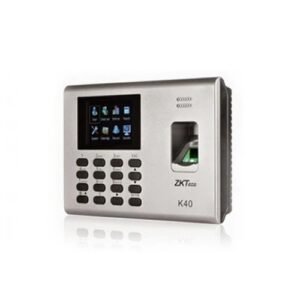
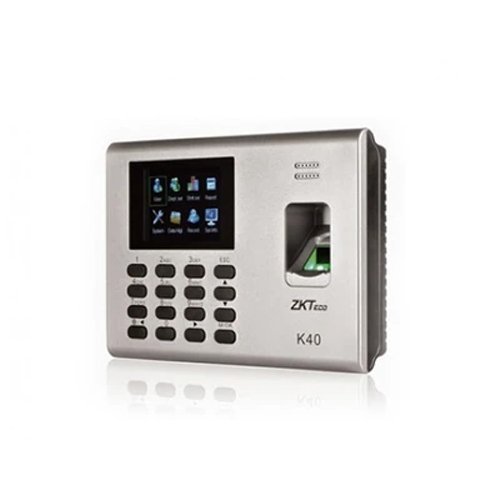
- Fingerprint Capacity 1000 (2000 without SSR )
- ID Card Capacity 1000 (Optional)
- Record Capacity 80,000
- Display 2.8-inch TFT Screen
- Communication TCP/IP, USB Host
- Standard Functions WDMS,Web Server, SMS, Automatic Status Switch,Self-Service Query, Work Code, T9
- input, 9 Digits User ID, DST, Schedule Bell
- Optional Functions ID/Mifare
- Software ZKTime.net 3.0
- Power Supply DC 12V 1.5A
- Verification Speed ≤0.5 sec
- Operating Temp. 0 °C- 45 °C
- Operating Humidity 20%-80%
- Dimension 184 × 136 × 37.6 (Length × Width × Thickness)
Q1. What is the ZKTeco K‑40‑ID attendance terminal used for?
The K‑40‑ID is a fingerprint time & attendance and access control terminal with ID card support, designed for offices, schools, factories, and SMEs that want both fingerprint and card verification.
Q2. Does the K‑40‑ID support fingerprint and ID card verification together?
Yes, K‑40‑ID supports both fingerprint and ID card verification, allowing employees to choose their preferred method for attendance and access control.
Q3. How many fingerprint templates and card IDs can K‑40‑ID store?
K‑40‑ID supports several thousand fingerprint templates and a large number of card IDs, suitable for small to medium‑sized organizations.
Q4. What communication options does the K‑40‑ID offer?
The K‑40‑ID typically supports TCP/IP, RS485, and Wiegand interfaces for integration with door locks, alarms, and attendance software.
Q5. Is K‑40‑ID suitable for indoor office and school environments?
Yes, K‑40‑ID is designed for indoor office, educational, and commercial environments, with a compact and modern design suitable for reception areas and corridors.
Q6. How easy is user enrollment with fingerprint and ID card on K‑40‑ID?
User enrollment is straightforward: enroll fingerprints by scanning the finger multiple times, and register ID cards by swiping or tapping them on the reader until the device confirms success.
Fingerprint + card dual‑mode review
Zahabi reviews whether K‑40‑ID’s dual fingerprint + ID card mode matches your access and attendance needs or if advanced face/palm options are better.
K‑40‑ID network and software integration
You get guidance on connecting K‑40‑ID via TCP/IP or RS485, configuring network settings, and linking it to your attendance software.
Access control and shift configuration
Zahabi helps you define access levels, groups, shifts, and holidays so K‑40‑ID controls entry and tracks attendance accurately.
Bulk enrollment and capacity planning
We assist with bulk fingerprint and card enrollment strategies and estimate capacity for K‑40‑ID across multiple sites.
Troubleshooting fingerprint, card, and network issues
If you encounter slow reads, card mismatches, or network problems, Zahabi walks you through sensor cleaning, card re‑registration, and network checks.
Multi‑site deployment planning
For businesses with multiple offices or floors, Zahabi helps plan K‑40‑ID locations and standardise configuration for consistent management.
Q1. What is the ZKTeco K‑40‑ID attendance terminal used for?
The K‑40‑ID is a fingerprint time & attendance and access control terminal with ID card support, designed for offices, schools, factories, and SMEs that want both fingerprint and card verification.
Q2. Does the K‑40‑ID support fingerprint and ID card verification together?
Yes, K‑40‑ID supports both fingerprint and ID card verification, allowing employees to choose their preferred method for attendance and access control.
Q3. How many fingerprint templates and card IDs can K‑40‑ID store?
K‑40‑ID supports several thousand fingerprint templates and a large number of card IDs, suitable for small to medium‑sized organizations.
Q4. What communication options does the K‑40‑ID offer?
The K‑40‑ID typically supports TCP/IP, RS485, and Wiegand interfaces for integration with door locks, alarms, and attendance software.
Q5. Is K‑40‑ID suitable for indoor office and school environments?
Yes, K‑40‑ID is designed for indoor office, educational, and commercial environments, with a compact and modern design suitable for reception areas and corridors.
Q6. How easy is user enrollment with fingerprint and ID card on K‑40‑ID?
User enrollment is straightforward: enroll fingerprints by scanning the finger multiple times, and register ID cards by swiping or tapping them on the reader until the device confirms success.
Fingerprint + card dual‑mode review
Zahabi reviews whether K‑40‑ID’s dual fingerprint + ID card mode matches your access and attendance needs or if advanced face/palm options are better.
K‑40‑ID network and software integration
You get guidance on connecting K‑40‑ID via TCP/IP or RS485, configuring network settings, and linking it to your attendance software.
Access control and shift configuration
Zahabi helps you define access levels, groups, shifts, and holidays so K‑40‑ID controls entry and tracks attendance accurately.
Bulk enrollment and capacity planning
We assist with bulk fingerprint and card enrollment strategies and estimate capacity for K‑40‑ID across multiple sites.
Troubleshooting fingerprint, card, and network issues
If you encounter slow reads, card mismatches, or network problems, Zahabi walks you through sensor cleaning, card re‑registration, and network checks.
Multi‑site deployment planning
For businesses with multiple offices or floors, Zahabi helps plan K‑40‑ID locations and standardise configuration for consistent management.