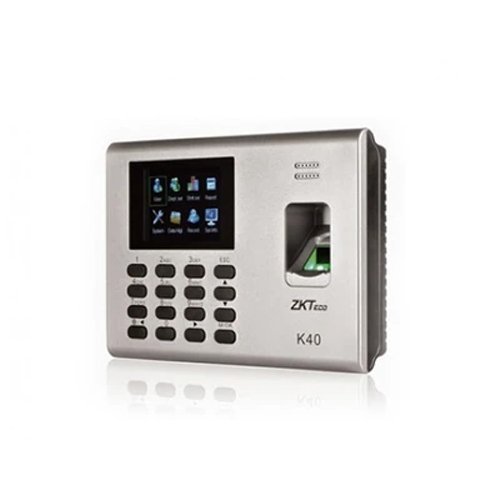
The device offers TCP/IP, USB host, Buitl-in battery, Simple access control or external bell, SSR report in excel forms, Supports WDMS.
ZKteco K40 is an innovative biometric fingerprint reader for access control application. With high-performance firmware functions and compact design, it has become one of ZKTeco’s most popular devices, because It is works with ZKTeco’s latest firmware with user-friendly UI and flexible user privilege settings for multi-level man With optimization of both hardware platform and firmware. The device offers TCP/IP, USB host, Buitl-in battery, Simple access control or external bell, SSR report in excel forms, Supports WDMS.
Q1. What is the ZKTeco K‑40‑ID attendance terminal used for?
The K‑40‑ID is a fingerprint time & attendance and access control terminal with ID card support, designed for offices, schools, factories, and SMEs that want both fingerprint and card verification.
Q2. Does the K‑40‑ID support fingerprint and ID card verification together?
Yes, K‑40‑ID supports both fingerprint and ID card verification, allowing employees to choose their preferred method for attendance and access control.
Q3. How many fingerprint templates and card IDs can K‑40‑ID store?
K‑40‑ID supports several thousand fingerprint templates and a large number of card IDs, suitable for small to medium‑sized organizations.
Q4. What communication options does the K‑40‑ID offer?
The K‑40‑ID typically supports TCP/IP, RS485, and Wiegand interfaces for integration with door locks, alarms, and attendance software.
Q5. Is K‑40‑ID suitable for indoor office and school environments?
Yes, K‑40‑ID is designed for indoor office, educational, and commercial environments, with a compact and modern design suitable for reception areas and corridors.
Q6. How easy is user enrollment with fingerprint and ID card on K‑40‑ID?
User enrollment is straightforward: enroll fingerprints by scanning the finger multiple times, and register ID cards by swiping or tapping them on the reader until the device confirms success.
Fingerprint + card dual‑mode review
Zahabi reviews whether K‑40‑ID’s dual fingerprint + ID card mode matches your access and attendance needs or if advanced face/palm options are better.
K‑40‑ID network and software integration
You get guidance on connecting K‑40‑ID via TCP/IP or RS485, configuring network settings, and linking it to your attendance software.
Access control and shift configuration
Zahabi helps you define access levels, groups, shifts, and holidays so K‑40‑ID controls entry and tracks attendance accurately.
Bulk enrollment and capacity planning
We assist with bulk fingerprint and card enrollment strategies and estimate capacity for K‑40‑ID across multiple sites.
Troubleshooting fingerprint, card, and network issues
If you encounter slow reads, card mismatches, or network problems, Zahabi walks you through sensor cleaning, card re‑registration, and network checks.
Multi‑site deployment planning
For businesses with multiple offices or floors, Zahabi helps plan K‑40‑ID locations and standardise configuration for consistent management.
Q1. What is the ZKTeco K‑40‑ID attendance terminal used for?
The K‑40‑ID is a fingerprint time & attendance and access control terminal with ID card support, designed for offices, schools, factories, and SMEs that want both fingerprint and card verification.
Q2. Does the K‑40‑ID support fingerprint and ID card verification together?
Yes, K‑40‑ID supports both fingerprint and ID card verification, allowing employees to choose their preferred method for attendance and access control.
Q3. How many fingerprint templates and card IDs can K‑40‑ID store?
K‑40‑ID supports several thousand fingerprint templates and a large number of card IDs, suitable for small to medium‑sized organizations.
Q4. What communication options does the K‑40‑ID offer?
The K‑40‑ID typically supports TCP/IP, RS485, and Wiegand interfaces for integration with door locks, alarms, and attendance software.
Q5. Is K‑40‑ID suitable for indoor office and school environments?
Yes, K‑40‑ID is designed for indoor office, educational, and commercial environments, with a compact and modern design suitable for reception areas and corridors.
Q6. How easy is user enrollment with fingerprint and ID card on K‑40‑ID?
User enrollment is straightforward: enroll fingerprints by scanning the finger multiple times, and register ID cards by swiping or tapping them on the reader until the device confirms success.
Fingerprint + card dual‑mode review
Zahabi reviews whether K‑40‑ID’s dual fingerprint + ID card mode matches your access and attendance needs or if advanced face/palm options are better.
K‑40‑ID network and software integration
You get guidance on connecting K‑40‑ID via TCP/IP or RS485, configuring network settings, and linking it to your attendance software.
Access control and shift configuration
Zahabi helps you define access levels, groups, shifts, and holidays so K‑40‑ID controls entry and tracks attendance accurately.
Bulk enrollment and capacity planning
We assist with bulk fingerprint and card enrollment strategies and estimate capacity for K‑40‑ID across multiple sites.
Troubleshooting fingerprint, card, and network issues
If you encounter slow reads, card mismatches, or network problems, Zahabi walks you through sensor cleaning, card re‑registration, and network checks.
Multi‑site deployment planning
For businesses with multiple offices or floors, Zahabi helps plan K‑40‑ID locations and standardise configuration for consistent management.
Rating & Reviews
How We Can Help You
Wide Selection, Better Choices
Find products that match your exact needs without compromise.
Built for Performance
High-quality materials and tested reliability you can depend on.
Smartly Curated
Only the best products make it to our platform, saving you time and effort.
Customer-First Approach
Trusted by shoppers who value quality, service, and consistency.
Drivers, Manuals & Support
Zahabi Support
From drivers and manuals to diagnostic tools and replacement parts, Zahabi Product Support has you covered!

 Download Datasheet