It brings many features, including stunning GUI, rock solid stability, fast matching speed and excellent expandability.
Biometrics Attendance System Management Solution
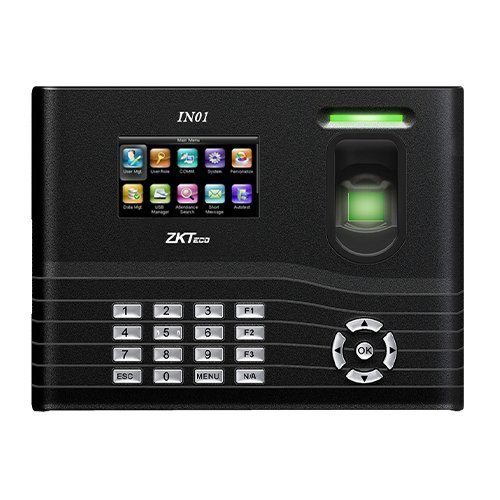
IN01 is a 3-inch TFT screen TIme Attendance Terminal. It is a well-designed device with the new user-friendly firmware and latest core board. It brings many features, including stunning GUI, rock solid stability, fast matching speed and excellent expandability.
Built-in 2000mAh backup battery can eliminate the trouble of power failure. Optional with Wi-Fi and GPRS make it easily manage the attendance data. It promotes the fingerprint time attendance management to the next level.
Q1. What is the ZKTeco INO1‑A biometrics attendance terminal used for?
The INO1‑A is a fingerprint time & attendance and access control terminal designed for offices, schools, clinics, and SMEs. It provides reliable fingerprint tracking and secure entry for everyday business use.
Q2. How many fingerprint templates can the INO1‑A store?
The INO1‑A supports several thousand fingerprint templates, suitable for small to medium businesses with hundreds of employees.
Q3. Does the INO1‑A support shifts, holidays, and attendance reports?
Yes, INO1‑A can be configured with shift schedules, holidays, and overtime rules, enabling detailed attendance reports for payroll and workforce management.
Q4. What communication interfaces does the INO1‑A offer?
The INO1‑A typically supports TCP/IP, RS485, and Wiegand interfaces for integration with door locks, alarms, and attendance software.
Q5. Is the INO1‑A suitable for indoor office environments?
Yes, the INO1‑A is designed for indoor office, educational, and commercial environments, with a compact design suitable for reception areas and corridors.
Q6. How straightforward is user enrollment on the INO1‑A?
User enrollment is simple: place your finger on the sensor multiple times until the device confirms successful capture. For larger teams, software‑based bulk enrollment can speed up the process.
Fingerprint attendance suitability check
Zahabi assesses your employee count and shift complexity to confirm whether INO1‑A is the right fingerprint‑only terminal.
INO1‑A network setup and software linkage
You receive step‑by‑step help on connecting INO1‑A via TCP/IP or RS485 and integrating it with your attendance software.
Shift, holiday, and overtime configuration
Zahabi helps you define shifts, holidays, and overtime rules so INO1‑A generates accurate attendance data.
Bulk user enrollment and capacity planning
We assist with bulk enrollment strategies and estimate fingerprint capacity for INO1‑A across multiple sites.
Troubleshooting fingerprint and network issues
If you encounter slow reads, misreads, or network problems, Zahabi walks you through sensor cleaning and network checks.
Multi‑site deployment standardisation
For businesses with multiple offices, Zahabi helps standardise INO1‑A configuration and plan deployment across sites.
Q1. What is the ZKTeco INO1‑A biometrics attendance terminal used for?
The INO1‑A is a fingerprint time & attendance and access control terminal designed for offices, schools, clinics, and SMEs. It provides reliable fingerprint tracking and secure entry for everyday business use.
Q2. How many fingerprint templates can the INO1‑A store?
The INO1‑A supports several thousand fingerprint templates, suitable for small to medium businesses with hundreds of employees.
Q3. Does the INO1‑A support shifts, holidays, and attendance reports?
Yes, INO1‑A can be configured with shift schedules, holidays, and overtime rules, enabling detailed attendance reports for payroll and workforce management.
Q4. What communication interfaces does the INO1‑A offer?
The INO1‑A typically supports TCP/IP, RS485, and Wiegand interfaces for integration with door locks, alarms, and attendance software.
Q5. Is the INO1‑A suitable for indoor office environments?
Yes, the INO1‑A is designed for indoor office, educational, and commercial environments, with a compact design suitable for reception areas and corridors.
Q6. How straightforward is user enrollment on the INO1‑A?
User enrollment is simple: place your finger on the sensor multiple times until the device confirms successful capture. For larger teams, software‑based bulk enrollment can speed up the process.
Fingerprint attendance suitability check
Zahabi assesses your employee count and shift complexity to confirm whether INO1‑A is the right fingerprint‑only terminal.
INO1‑A network setup and software linkage
You receive step‑by‑step help on connecting INO1‑A via TCP/IP or RS485 and integrating it with your attendance software.
Shift, holiday, and overtime configuration
Zahabi helps you define shifts, holidays, and overtime rules so INO1‑A generates accurate attendance data.
Bulk user enrollment and capacity planning
We assist with bulk enrollment strategies and estimate fingerprint capacity for INO1‑A across multiple sites.
Troubleshooting fingerprint and network issues
If you encounter slow reads, misreads, or network problems, Zahabi walks you through sensor cleaning and network checks.
Multi‑site deployment standardisation
For businesses with multiple offices, Zahabi helps standardise INO1‑A configuration and plan deployment across sites.
Rating & Reviews
How We Can Help You
Wide Selection, Better Choices
Find products that match your exact needs without compromise.
Built for Performance
High-quality materials and tested reliability you can depend on.
Smartly Curated
Only the best products make it to our platform, saving you time and effort.
Customer-First Approach
Trusted by shoppers who value quality, service, and consistency.
Drivers, Manuals & Support
Zahabi Support
From drivers and manuals to diagnostic tools and replacement parts, Zahabi Product Support has you covered!

 Download Datasheet