Planning an event is difficult enough without registration queues, misplaced badges, or attendees reaching areas they should not access. For conferences, exhibitions, festivals, and corporate events in Kuwait, the credential you give each attendee needs to do more than display a name. It may also need to control access, support check-in, or help your team identify different attendee groups quickly.
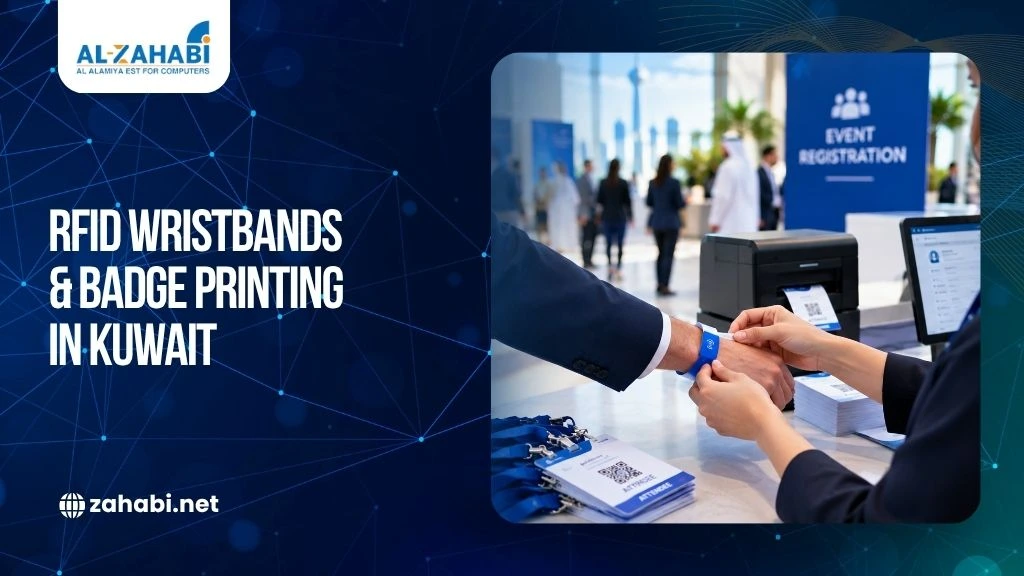
RFID wristbands for Kuwait events can connect attendee identification with electronic access control, while printed badges provide visible identification for conferences and exhibitions. The two can also work together when an event needs both quick access and clear attendee information.
The challenge is choosing the right credential, printer, reader, consumables, and registration setup before event day. Understanding RFID inventory system cost considerations can also help planners evaluate the potential investment when RFID hardware and supporting equipment are part of a larger event technology setup.
A well-planned system can make entry smoother for attendees and easier for your staff to manage.
Key Takeaways:
- RFID wristbands can combine attendee identification with electronic access control.
- Printed badges remain useful for conferences, exhibitions, and networking.
- Your RFID reader, credential, software, and access rules must be compatible.
- Badge printing should be planned around peak registration demand, not just total attendance.
- Testing the complete setup before the event helps reduce last-minute problems.
Start With the Event Workflow, Not the Hardware
Before choosing an RFID wristband or badge printer, map how attendees will move through your event.
Ask yourself where people will register, which entrances they will use, and whether different attendee groups need different permissions.
A conference may have general attendees, speakers, exhibitors, VIP guests, media representatives, and staff. These groups may not need the same level of access.
For example, a speaker might need access to the main hall, speaker room, and backstage area, while a general attendee may only need the conference and exhibition areas.
This is where RFID can become useful. An RFID credential can be associated with an attendee and used at designated access points, provided the reader and event-management system support that workflow.
GS1 notes that RFID technologies differ by frequency and application. HF RFID, for example, is commonly used for event ticketing and access-related applications, while UHF RFID is widely used for fast identification, inventory, and tracking.
So, do not choose an RFID credential simply because it is labelled “RFID.” Understanding different barcode and RFID scanning technologies can help planners select credentials and readers based on the actual identification and access requirements of the event.
Confirm that its technology matches the reader and system you intend to use.
Planning an event in Kuwait? Start by mapping your access zones and attendee categories before purchasing credentials or hardware.
RFID Wristbands for Kuwait Events: Where They Fit Best
In Kuwait, RFID wristbands can be particularly useful for large public gatherings, festivals, exhibitions, and multi-day events where attendees may move between several controlled areas. For outdoor events, planners should also consider heat, dust, moisture, and prolonged wear when selecting the wristband material and testing readers.
A wristband also reduces the need for attendees to keep a badge or ticket in a pocket or bag.
However, the wristband is only one part of the system. You also need a compatible RFID reader, appropriate software, configured access permissions, and a process for handling lost or damaged credentials.
Read range should not be treated as a universal specification either. GS1 explains that RFID read range varies according to factors such as technology, reader power, interference, antenna characteristics, and tag orientation.
That means your actual event environment matters.
A reader that performs well in a controlled test area may behave differently when placed at a crowded entrance with people moving through quickly.
Match the Wristband to the Event
Consider how long attendees will wear the wristband and what they will be doing while wearing it.
A short event may require a different credential from a three-day festival. If attendees will be moving between outdoor and indoor areas, durability and comfort become more important.
You should also decide how replacement credentials will be handled.
If someone loses a wristband, your team should know whether the old credential can be deactivated and a replacement issued through the event system.
Test this workflow before opening registration.
Printed Badges Still Matter at Conferences and Exhibitions
RFID does not make printed badges obsolete.
For business conferences and exhibitions, a visible badge can be valuable because attendees can immediately see a person’s name, company, or role.
A printed badge can support networking in a way that an electronic credential alone cannot.
This is particularly relevant for Kuwait’s business events, trade exhibitions, conferences, and corporate gatherings, where attendees may move between networking areas, exhibitor booths, meeting rooms, and restricted sections of the venue. Clearly displaying an attendee’s name, company, and role can make these interactions easier for both visitors and event staff.
This is why event badge printing in Kuwait often works best when it is planned alongside the access-control system rather than treated as a separate task.
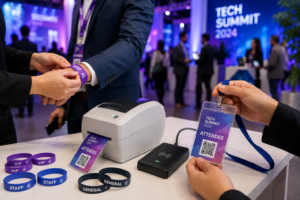
For example, an exhibition could issue a printed badge showing:
- Attendee name
- Company
- Job title
- Attendee category
- Event branding
The RFID component can then provide electronic access to designated areas.
This creates two layers of identification: visible information for people and electronic identification for the access system. A complete ID badge system for event identification can help organisers bring together printed credentials and the accessories needed for a professional attendee experience.
Zahabi’s ID card printing solutions include printers, PVC cards, ribbons, and accessories for applications such as visitor badges and access-control cards.
If your event needs durable printed credentials, explore Zahabi’s ID Cards & Accessories range when planning your badge setup.
Preprinted or On-Demand Badge Printing?
Your registration process should determine how badges are produced.
Preprinted badges work well when attendee information is confirmed well before the event. You can prepare credentials in advance and organise them by attendee category.
The drawback is flexibility.
Late registrations, spelling corrections, company changes, and replacement badges can quickly make a fully preprinted system inconvenient.
On-demand printing provides more flexibility. The registration system can send attendee information to the printer as the person checks in.
Imagine an exhibitor arriving with a last-minute change to their company information. With on-demand printing, the registration team can correct the details and produce a new badge rather than manually altering an existing credential.
A hybrid approach can also work.
You can preprint the fixed event design while printing attendee-specific information during registration.
Choosing the Right Printing Equipment
The badge printer should be selected according to your registration workflow and peak demand.
Do not look only at the total number of attendees.
If 1,000 people are attending but 700 are expected to arrive during the first two hours, the registration area needs to handle that concentrated workload.
Consider:
- Expected peak check-ins
- Number of registration desks
- Badge size and material
- Colour or monochrome printing
- Connection options
- Registration software compatibility
- Spare supplies
- Replacement requirements
The printer should also be tested with the exact badge stock you plan to use. Reviewing common ID card printer buying mistakes can help event teams avoid selecting equipment that does not match their badge material, registration volume, or printing workflow.
A successful test print should confirm the layout, alignment, image quality, text placement, and overall readability.
If you are setting up a broader identification system, Zahabi’s ID Cards & Accessories category can also support the cards, ribbons, and related supplies needed for credential production.
Need help planning the printing side of your event? Choose the printer and badge material based on your peak registration workflow rather than simply buying the fastest-looking model.
Build a Practical Registration Desk
The registration desk is where your credentialing plan becomes a real attendee experience.
A slow or badly organised desk can create queues even when the RFID access system itself works perfectly.
Each station may need a registration computer, badge printer, blank credentials, ribbons or other consumables, and a clear process for handling exceptions.
If the event has multiple registration counters, standardise the setup as much as possible.
Staff should know how to:
- Find the attendee record.
- Confirm registration details.
- Print or issue the credential.
- Explain access permissions when required.
- Handle lost or incorrect credentials.
- Escalate technical problems.
For larger events, a Kiosk can also be considered for self-service registration or check-in, depending on the software and workflow.
Exploring self-service kiosk options for event registration can help organisers determine whether automated check-in could reduce queues at busy entrances.
The goal is not to add equipment for its own sake. Every device should remove a bottleneck from the attendee journey.
Exhibition Access Control RFID
Exhibitions often require more complicated access rules than a single-entry event.
You may have exhibitors, visitors, organisers, contractors, speakers, and VIP guests moving through the same venue.
Exhibition access control RFID can help separate these access levels when the RFID system supports the required permissions.
For example:
Attendee type | Main exhibition | VIP area | Staff area |
Visitor | ✓ | — | — |
Exhibitor | ✓ | — | Limited |
VIP | ✓ | ✓ | — |
Staff | ✓ | As assigned | ✓ |
Speaker | ✓ | ✓ | As assigned |
This type of access map should be created before equipment is installed.
Once the zones are defined, you can determine where readers need to be placed and which credential categories should be authorised at each location.
Do not wait until installation day to decide who can enter which area.
Connecting RFID With Other Event Equipment
A larger event may use several technology layers.
For example, registration may involve a kiosk or computer, badge printing may happen at the registration counter, RFID readers may control restricted areas, and mobile devices may be used by staff to verify attendee information.
Mobile Computers can be useful when staff need to move around the venue rather than remain at a fixed desk.
For example, an event team could use a mobile computer to verify registration details at an exhibitor area or help resolve an attendee issue away from the main registration counter.
The same principle applies to other event technology.
If your event includes merchandise sales, food counters, or paid services, POS Machines and POS Accessories may form another part of the setup.
For events selling products or refreshments, a Receipt Printer can provide printed transaction records at the point of sale.
Meanwhile, a Price Checker Kios can be relevant to exhibitions or retail-style event environments where attendees need to check product prices without waiting for staff.
These systems are separate from RFID access control, but they can form part of the wider event technology environment.
RFID Solutions Need Compatibility Checks
One of the biggest planning mistakes is purchasing individual components without checking whether they work together.
Avoiding common RFID implementation mistakes can help event planners prevent compatibility, configuration, and workflow problems before event day.
Your RFID wristband, reader, printer, software, and access-control platform should be evaluated as a complete system.
For example, a wristband may use an RFID technology that your selected reader does not support. Similarly, a printer may not be designed for the credential material you intend to use.
Zahabi provides RFID Solutions including RFID readers, antennas, printers, and tags for identification and tracking applications.
GS1 also maintains RFID standards and implementation resources covering areas such as RFID air interfaces, software interfaces, and EPC-related technologies.
If you are planning an RFID deployment, confirm the technology, frequency, credential type, reader, and software requirements before placing a bulk order.
For a new event setup, discuss the complete workflow with your technology supplier before ordering large quantities of wristbands or badges.
Plan for Lost Badges and Failed Credentials
No registration system should assume that every attendee will arrive with the correct credential and that every device will work perfectly.
Prepare for:
- Lost wristbands
- Damaged badges
- Incorrect attendee details
- Duplicate registrations
- Printer problems
- Network interruptions
- Late registrations
- Unauthorised access attempts
The replacement process should be simple enough for registration staff to follow without contacting the technical team for every case.
If a lost RFID credential can be deactivated through your system, staff should know how to do it.
You should also maintain spare credentials.
Ordering exactly the number of confirmed attendees leaves no room for damaged credentials or unexpected registrations.
The right contingency quantity depends on your event and workflow, so build a reasonable reserve into the procurement plan rather than treating spares as an afterthought.
Test the Entire Event Workflow Before Opening the Doors
Testing only the printer is not enough.
Run a complete simulation before the event.
Register a test attendee, produce the badge or wristband, scan the credential at every relevant access point, test restricted areas, and process a replacement credential.
Also test an invalid or unauthorised credential.
This gives your team a chance to identify problems while there is still time to correct them.
Pay particular attention to busy entrances. RFID performance depends on the technology and physical environment, so testing the actual reader positions and credential behaviour is more useful than relying only on specifications.
Your registration staff should also practise common exceptions.
A five-minute test during setup is not enough. Run the workflow as if real attendees were arriving.
Keep Event-Day Supplies Organised
Consumables can become a surprisingly important part of event planning.
Keep spare badges, RFID wristbands, ribbons, printer supplies, and other required materials close to the registration area.
If your event uses badge printing, organise supplies so staff can identify replacements quickly.
If several printers are running, keep compatible supplies clearly labelled for each device.
For events using barcode labels elsewhere in the operation, Zahabi also provides Barcode Printing solutions and printing supplies for different business environments.
The principle is simple: do not let a low-cost consumable become the reason an expensive event workflow stops.
A Practical Event Setup Example
Consider a three-day business exhibition in Kuwait with general visitors, exhibitors, VIP guests, speakers, and event staff.
General visitors receive printed badges with their names and companies. Exhibitors receive badges with additional access permissions.
VIP guests receive credentials that allow access to a dedicated lounge, while staff receive credentials for operational areas.
At registration, badges are printed on demand so late registrations and corrections can be handled without disrupting the process.
RFID readers are positioned at selected restricted entrances. Staff have access to the registration system and spare credentials in case a replacement is required.
A mobile computer can help event staff verify attendee information away from the registration desk.
The important part is not any individual device. It is the workflow connecting registration, credential issuance, access control, and exception handling.
Conclusion
A successful credentialing system starts with the attendee journey, not the hardware catalogue. RFID wristbands for Kuwait events can support electronic access control, while printed badges provide the visible identification that remains useful at conferences and exhibitions.
Before your event, define access zones, choose compatible RFID technology, plan badge printing around peak registration, prepare spare credentials, and test the complete workflow.
If you are planning an event in Kuwait, the next step is to map your attendee categories, access points, and expected registration volume. Zahabi can then help you identify the appropriate RFID, ID card printing, kiosk, mobile computing, and related equipment for your setup.
Frequesntly Asked Questions
1. Are RFID wristbands suitable for events in Kuwait?
Yes, RFID wristbands can be suitable for events in Kuwait where attendees need electronic identification or controlled access. They can work well for festivals, exhibitions, conferences, and multi-day events. Suitability depends on the RFID technology, reader, software, venue conditions, access requirements, and how credentials are managed during the event.
2. Can RFID wristbands and printed badges be used at the same event?
Yes. RFID wristbands and printed badges can serve different purposes at the same event. A printed badge can display the attendee’s name, company, role, or category, while an RFID credential can support electronic access to designated areas. This combination can be useful for conferences, exhibitions, and other events with multiple access levels.
3. What should I consider when planning event badge printing in Kuwait?
Consider your expected attendance, peak check-in volume, badge material, printer capacity, colour requirements, software compatibility, and available consumables. You should also decide whether badges will be preprinted or produced on demand. For Kuwait events, consider the venue layout and registration points when determining how many printing stations you may need.
4. What is exhibition access control RFID used for?
Exhibition access control RFID can help manage entry to specific areas when compatible RFID credentials, readers, and access-control software are configured together. For example, exhibitors, visitors, VIP guests, speakers, and staff can receive different access permissions. This allows organisers to control restricted areas while keeping general exhibition access straightforward.
5. Should I test RFID equipment before an event?
Yes. Test the complete workflow, including credential issuance, reader performance, access permissions, replacement credentials, and registration processes. Testing the actual venue setup can reveal issues that specifications alone may not show.