
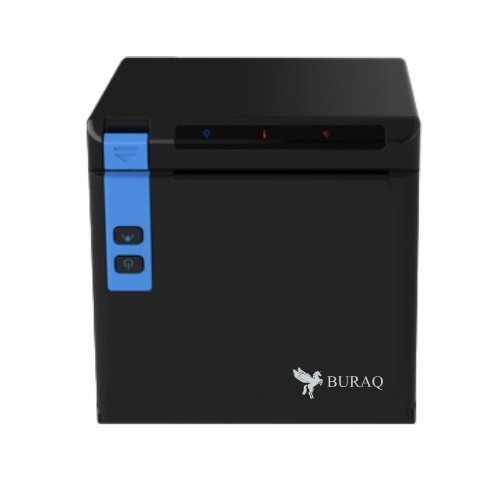
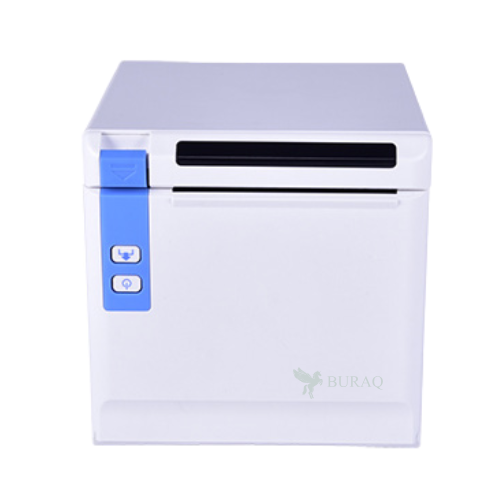

The Buraq POS80D is an 80mm thermal receipt printer. Distinctive in its design, the POS80D has a small footprint but still is able to offer great performance, greater than or equal to competing 80mm printers.
The Buraq POS80D comes with a dual WIFI & USB interface as standard. Compact yet solid, it incorporates user friendly features such as anti-jam technology, a water-resistant surface and drop-in paper loading.
- Supports Top or Front paper loading
- Compact footprint and ideal for limited counter spaces
- High printing speed up to 260mm/s
- 3 LED Status Indicators: Power, Paper, Error
- Quiet printing noise
- Versatile interfaces: Wi-Fi, USB, Cash Drawer
Q1. What are the key features of the Buraq POS80D 80mm receipt printer?
The Buraq POS80D is an 80mm thermal receipt printer with both Wi‑Fi and USB connectivity, ideal for modern POS setups that need flexible placement and wireless printing.
Q2. How do I connect the POS80D via Wi‑Fi to my POS system?
You configure the printer’s Wi‑Fi settings (SSID, password, IP) using its utility, ensure it joins your store network and then set the printer IP in your POS software.
Q3. Can I use the USB connection as a backup if Wi‑Fi fails?
Yes, you can connect the POS80D directly via USB to a POS terminal or PC, providing a fallback option if wireless connectivity is unstable.
Q4. Is the Buraq POS80D compatible with ESC/POS and common POS software in Kuwait?
The printer is ESC/POS‑compatible and works with many Windows and Android POS applications used by supermarkets, cafés and small shops in Kuwait.
Q5. Does the POS80D support printing QR codes, logos and barcodes?
Yes, you can print QR codes, barcodes, logos and promotional text through POS software that supports these ESC/POS features.
Q6. Is this printer suitable for both dine‑in and delivery billing?
Yes, the combination of Wi‑Fi and USB makes it flexible enough for dine‑in counters, takeaway desks and kitchen or dispatch areas.
Wi‑Fi network configuration support
We assist you with SSID, password and IP configuration so the POS80D connects reliably to your wireless network.
Dual‑interface setup (USB + Wi‑Fi)
Our team helps you configure USB and Wi‑Fi modes and choose the right one for each terminal.
POS software mapping & testing
We guide you through adding the POS80D as a printer in your POS and testing receipts and test pages.
Troubleshooting wireless printing issues
We help diagnose signal strength, interference and IP conflicts that may affect Wi‑Fi printing.
Consumables & long‑term usage tips
We recommend suitable 80mm thermal rolls and maintenance tips to keep the POS80D running smoothly.
Q1. What are the key features of the Buraq POS80D 80mm receipt printer?
The Buraq POS80D is an 80mm thermal receipt printer with both Wi‑Fi and USB connectivity, ideal for modern POS setups that need flexible placement and wireless printing.
Q2. How do I connect the POS80D via Wi‑Fi to my POS system?
You configure the printer’s Wi‑Fi settings (SSID, password, IP) using its utility, ensure it joins your store network and then set the printer IP in your POS software.
Q3. Can I use the USB connection as a backup if Wi‑Fi fails?
Yes, you can connect the POS80D directly via USB to a POS terminal or PC, providing a fallback option if wireless connectivity is unstable.
Q4. Is the Buraq POS80D compatible with ESC/POS and common POS software in Kuwait?
The printer is ESC/POS‑compatible and works with many Windows and Android POS applications used by supermarkets, cafés and small shops in Kuwait.
Q5. Does the POS80D support printing QR codes, logos and barcodes?
Yes, you can print QR codes, barcodes, logos and promotional text through POS software that supports these ESC/POS features.
Q6. Is this printer suitable for both dine‑in and delivery billing?
Yes, the combination of Wi‑Fi and USB makes it flexible enough for dine‑in counters, takeaway desks and kitchen or dispatch areas.
Wi‑Fi network configuration support
We assist you with SSID, password and IP configuration so the POS80D connects reliably to your wireless network.
Dual‑interface setup (USB + Wi‑Fi)
Our team helps you configure USB and Wi‑Fi modes and choose the right one for each terminal.
POS software mapping & testing
We guide you through adding the POS80D as a printer in your POS and testing receipts and test pages.
Troubleshooting wireless printing issues
We help diagnose signal strength, interference and IP conflicts that may affect Wi‑Fi printing.
Consumables & long‑term usage tips
We recommend suitable 80mm thermal rolls and maintenance tips to keep the POS80D running smoothly.


Reviews
There are no reviews yet.